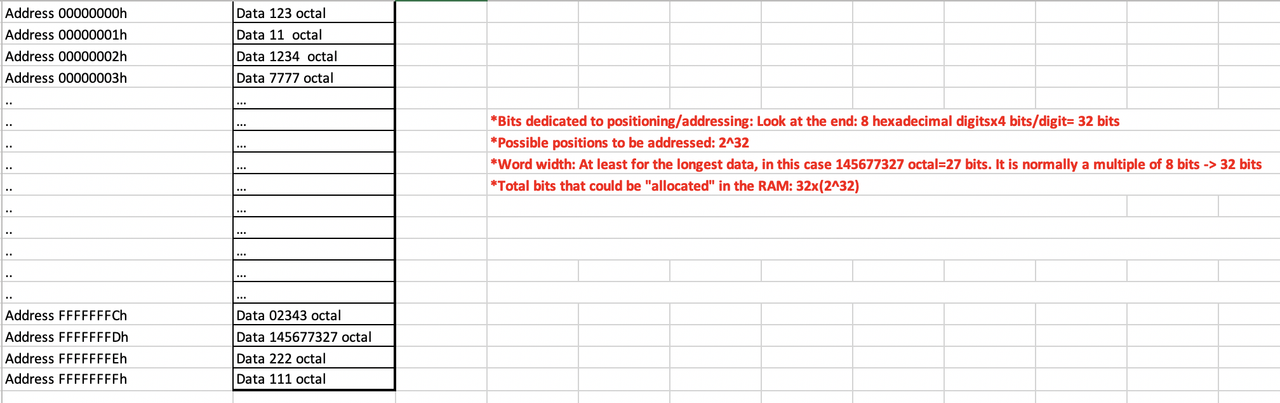
- ⭐️ a RAM that ends in 8Fs or 16Fs, there will be one of two models
- ⭐️ how many bits are we using?
- ⭐️ what is the maximum capacity?
- ⭐️ give one address of RAM in binary, we have data xxx.
- ⭐️ address/positions should be transformed into hexadecimal, data into octal
✅ RAM
storage of open files and applications = processes
1
2
3
4
| Q_1: If the last address of the RAM is FFFFFFFFh, how many bits are there in this address?
A: each F has 4 bits internally, has 4 * 8 = 32 bits
- thus, this RAM is using 32 bits for the address
- thus, this RAM is using 32 bits for addressing(direcionar) the RAM
|
☑️ Capacity of RAM
1
2
3
4
5
6
| 1 time 2^10 = 1024 = Kilo
2 times 2^10 = 1024 * 1024 = Mega
3 times 2^10 = 1024 * 1024 * 1024 = Giga
4 times 2^10 = 1024 * 1024 * 1024 * 1024 = Tera
5 times 2^10 = 1024 * 1024 * 1024 * 1024 * 1024 = Petta
6 times 2^10 = 1024 * 1024 * 1024 * 1024 * 1024 * 1024 = Exa
|
- so,
4 * Giga bytes - in conclusion, if the last address of the RAM is
FFFFFFFFh, this RAM has a total of 4 Giga Bytes
1
2
3
4
| Q: If a person bought 16G of RAM, but can only use 4GB, what is happening?
A: Is is bc the OS is using only 32bits for addressing the RAM
and with 32bits, you can only 4GB of RAM
⭐️ Solution: so you should change your OS to use more bits, OS that uses 64bits for the RAM
|
- Every OS has 2 versions,
version of 32 and version of 64 - and depending on the version, the RAM can be totally useable, or not
📌 Hexadecimal
numbering system that groups bits by 4, starting by the right
for example, 1111 = 15 = F
- 1️⃣ divide bits by grouping them into 4, starting by the right
- if the group is not complete, complete left with 0
- 2️⃣ then applies the weight rule to each group of 4
- 3️⃣ then changes the weight of 10 into the letter A
- 11 ➡️ B
- 12 ➡️ C
- 13 ➡️ D
- 14 ➡️ E
- 15 ➡️ F
- 4️⃣ add a
h
1
2
3
4
5
6
7
8
9
10
11
12
13
14
15
16
17
18
19
20
21
22
23
| address = 010101111111
1️⃣ divide into groups of 4, from the right
- 1111
- 0111
- 0101
2️⃣ apply weight
- 8421 / 8421 / 8421
- 1111 = 1 + 2 + 4 + 8 = 15
- 0111 = 1 + 2 + 4 = 7
- 0101 = 1 + 4 = 5
3️⃣ change weight into letter
- 15 = F
- 7
- 5
💡 result is 57F
4️⃣ always add h to say this address is hexadecimal
💡 result is 57Fh
|
1
2
3
4
5
6
7
8
9
10
11
12
13
14
15
16
17
18
19
20
| address = 1110110
1️⃣ divide into groups of 4, from the right
if group is not complete, add 0 to the left
- 0111
- 0110
2️⃣ apply weight
- 0111 = 7
- 0110 = 6
3️⃣ change weight into letter
nothing to change
- 7
- 6
👉🏻 result is 76
4️⃣ always add h to say this address is hexadecimal
👉🏻 result is 76h
|
1
2
3
| 1110
weight = 14
👉🏻 result is Eh
|
- Sometimes in Windows, the
h in hexadecimal is used as 0x
✅ How will the RAM in a OS of 64bits work?
- If we have a RAM of
FFFFFFFFFFFFFFFFh(16Fs), - we have
4 bits * 16 = 64bits for addressing the RAM - following the computing principle, we can have
2^64 different addresses in the RAM - if in each of the addresses, if we put
1 byte in each address - our RAM will be
2^64 = 2^4 * 2^10 * 2^10 * 2^10 * 2^10 * 2^10 * 2^10 - 🟰
16 * 1000 * 1000 * 1000 * 1000 * 1000 * 1000 - 🟰
16 Exa - So if a RAM of
64bits, we will have 16 Exa bytes of capacity - This capacity of RAM does not exist yet, bc of limits of
- 👎🏻 temperature(heat)
- and 👎🏻 we do not have technology to divide RAM into
16 trillion addresses
1
2
3
4
5
6
| ⭐️ Exam Question
Q: If you have 16GB of RAM and it is useable, how many bits will you be using for addressing RAM?
A: You will have 64bits
❓❓❓❓❓
Q: If we have a word width of 1byte per address, how much data can we save on this RAM?
A: 2^64bytes
|
📌 Computing principle
- Everything in computing is always a
power of 2 - there is nothing between for example,
32 and 64
1
2
| Q: If somebody is selling you 300G of harddisk, is he saying the truth?
A: NO, they are rounding up from 256G, 300G of harddisk does not exist.
|
1
2
| Q: If somebody is selling you 2.5Tera, is he saying the truth?
A: NO, maybe they have 2 Tera and 512 Giga.
|
✅ Word width
Word width: Capacity of each address in RAM
📌 Octal
numbering system that groups bits by 3, starting by the right
- 1️⃣ create group of 3 bits
- 2️⃣ apply weight
4, 2, 1
1
2
3
4
5
6
7
8
9
10
11
12
13
14
| original binary: 01010101
1️⃣ create group of 3 bits
- 101
- 010
- 001
2️⃣ apply weight
- 101 = 4 + 1 = 5
- 010 = 2
- 001 = 1
👉🏻 result: 125o
👉🏻 read: one two five octal ⭕️
- reading one hundread twenty five octal ❌ this is reading decimal
|
- 🛠️ Use of octal
- When we talk about the RAM, we talk about the address in hexadecimal
- However, when we talk about the data size inside the RAM, we use octal
- 👍🏻 we are trying to make numbers shorter, from decimal to octal
- example:
In address FA3h(address, hexadecimal), we are saving 125o(data size, octal)
1
2
3
4
5
6
7
8
9
| ⭐️ Exam question
Q:
In address: 0001110101
we have byte 00011101 saved
Transform this into conventional numbering system for main memory(RAM)
A:
In address 075h, we have data that has size 035o saved inside
|
1
2
3
4
| Q: If you get a error message in windows saying,
there is an error in 0x 0FA3, where should you be looking?
A: Ox means hexadecimal in windows, so look at address 0FA3
|
✅
✅
✅