5. Linux Branched
✅
/root directory: origin of the treeroot user- are not the same!
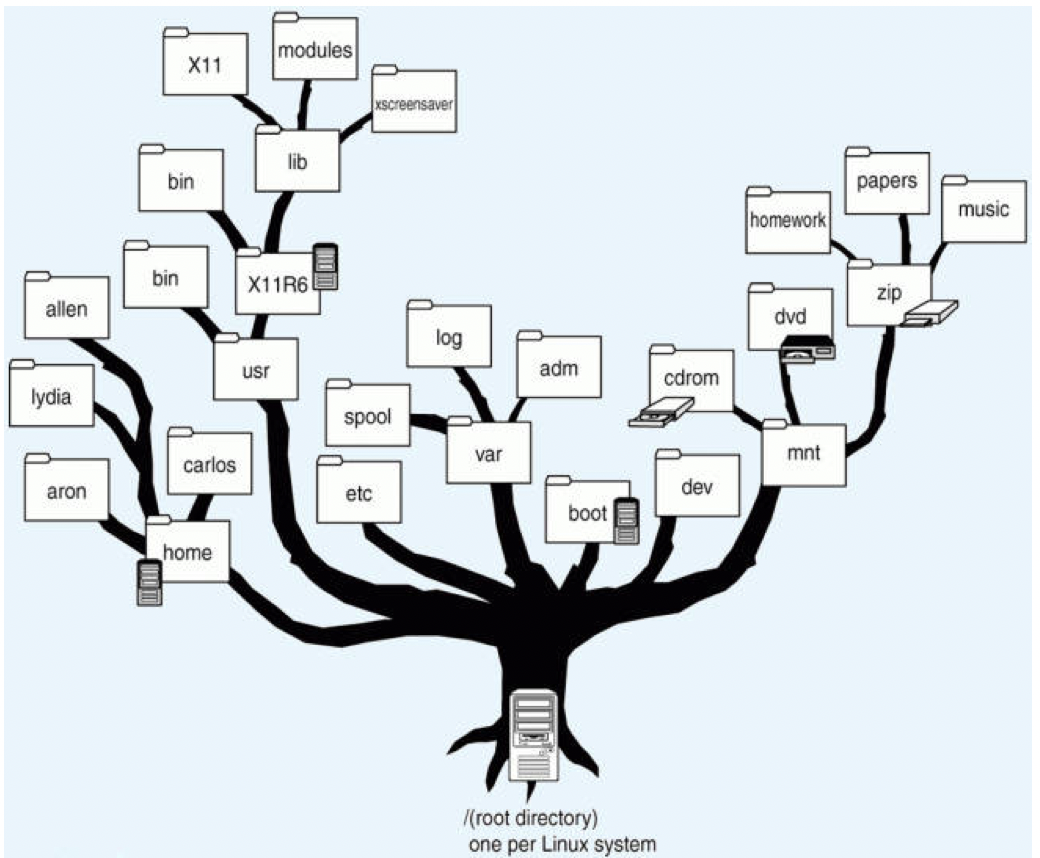
✅ Level 0
/means root, origin of the treekernelroot directory- all mean the same
✅ Level 1
- all have a name
/smth - we store the most important components of Linux
- ⚠️ they can never be deleted
only
super usercan delete it- 👀
/bin,/home,/boot,/user…
☑️ Types of Level 1 branches
- ✔️
/bin - binary files, executable files
- we have the commands that the users can execute
1
2
3
❓ I want user Diario to not be able to run a command
- I delete the command from /bin
- and move it to another place, and put a . on it
- ✔️
/sbin - executable files for the super user
commands that only the super user can execute
- ✔️
/boot - partition with booting options
- we keep the
GRUBif we have the legacy BIOS - from
/boot, if we chose UEFI, we will have/boot/efi and have the
GRUBinside/boot/efi- 💡 Note:
- sub branches(level 2 branch) can have different format from the main branch
for example,
/bootand/boot/efican have different format- 💡 Note:
- If we keep updating the Linux many times,
/bootwill keep growing and occupy all1GB- 😱 Incident: so when you get a message
no space in /boot - 💊 ask
super userto clean it - with the command
sudo apt autoremovesudo: superuser doapt: use the command inaptautoremove: clean
- after this command, you can clean the
/boot and go back to minimum
300MB- ✔️
/dev branch in which all the disks and partitions of disks are represented/stored
- the mountpoint for all the disks and partitions of disks
- 👀
/dev/sda1 /dev/sda1my partitions are hardware 🆚/devis software- so it is like a nickname
- ✔️
/etc - for extras
- the most important first level branch!
- gives all the settings to the system
- the most important settings are there
- originally created for extra files,
- but after kernel 4, they started using it for the most important things
👀 users, passwords, setting files for my system…
- ✔️
/home - personal folder
- dedicated to personal information
- in
/home, there is a second level branch, per user - so each user has each
/home - 👀
/home/shpl - my personal folder will have a little nickname
~ ~🟰/home/shpl- if you send files to
~, you are sending files to personal directories
❓ What do we have inside ~?
- they will be level 3 branches
- Downloads(level 3),
/home/shpl/downloads - Desktop
- Documents
- Pictures
- Templates
- videos
Music
What we have in
~🟰/home/shplis only visible for me- 💡 Note:
- If you want to hide/secret a file/folder
- then add a
.in front 👀
Downloads➡️.Downloads- ✔️
/lib - specific files for making other files work
in
libwe have all the resources to run the commands for/bin- ✔️
/slib - library for the commands of the super user, that are in
sbin
1
2
3
4
5
6
7
❓ If a command does not work, what is the two possibility happening?

1. we have a problem in the /lib
a missing /lib of that command
or corrupt library

2. the command disappeared from /bin
- ✔️
/lib64 - libraries for 64 bits
- nowadays everything is 64 bits
- so sometimes, this folder does not exist
and everything is inside
/lib- ✔️
/root - same as
/homeof the super user, which is/home/su /root: personal folder for super user- when we become the super user, (⚠️ not recommended)
- our downloads, our pictures are no longer in
~ they will be inside
/root- ✔️
/usr - folder shared by users
- folders for users in general
when you want to share smth with the other user, put it in the
/usrdirectory- this branch is always surveyed by super user
so if you want to do smth in
/usryou need to get the permission of super user- ✔️
/sis - all the events of the kernel
- everything that happens in the kernel
- events of failure in the kernel
👀 IPC warning messages
- ✔️
/proc all the events of failure
- ✔️
/srv - server
- everything connected to internet settings
- 👀
/srv/www: everything that happens when we navigate on the internet - 👀
/srv/ftp: everything that happens when we upload, download files
1
2
3
4
5
6
❓ If smth fails while the navigaing the web, where is the errors saved?

- /proc

When things are not with an error while navigating in the web?
- it would be stored in /srv/www
1
2
3
4
5
6
7
8
⭐️ Cheatsheet ⭐️
/srv/www: when navigation on internet goes ok
/srv/ftp: when you upload file to internet
/proc: when navigation fails
/sis: when the kernel fails

❓ I have a kernel booting error. Where can I check the error?
➡️ /sis
- ✔️
/opt - store all the optional things that do not come with the standard download with the linux
- 🟰 things that do not come in the standard repositories
🟰 things that do not come with default in linux
- 👀
tree: command to show you the tree - but to run this command, you have to install this command manually
- does not come with linux initialization settings
- so it would be inside
/opt
- 👀
- ✔️
/tmp - temporal files
- forbidden to delete it manually ❌
if you delete it, some commands will fail
- ✔️
/var - branch for saving important system information
👀 systems variables
- ✔️
/media - related to extra devices that do not come by default in
/dev - 👀 my partitions are in
/dev - but if I install a CD reader, USB reader, camera(not standard)
- they will be stored in
/media - 👀 Guest Additions are considered a
iso, so it will be stored in the/media
💡 / is the root and separator
/: we have the kernel here- but
/is also a separator - also used for separating the branches
👀
/home/carlosis a branch hanging from/- branch 🟰 directory
- in Linux, we do not say folders, we say directories