5.9 Files in Linux
✅ Linux
- file system:
ext2, 3, 4
✅ Rules of files in linux
1️⃣ Files do not have extensions
- unless, you want to add an extension on purpose
- if you add an extension
- it becomes part of the name
patata.txt- name:
patata, extension:txt❌ - this is not a text file named patata ❌
- name:
patata.txt - this is a file that has name patata.txt without extension
2️⃣ Metadata of the file are
✔️ What is metadata?
- size of the file
- owner of the file
- date and time of creation
- date and time of last modified
- permissions: read/write/execute 👀
soheecan only read- what the person can do
- access control: who can do things with that file, users 👀
root,sohee- the users
- location: where the file is
- timestamps: modifications of the file, modification dates
- pointer to the file
✔️ Inodes table
- Where is the metadata?
- all the metadata is separated from the file itself
- inside the inodes table
- inodes table: saves metadata of the file
- inodes table is inside the
OS in RAM - 🆚 whereas the file iteslf will be stored in
Harddisk
✔️ inside the Inodes table
- inside the table, there is a identifier inode number
✔️ How to read the file
- find the inode number
- go to the OS in RAM
- find the metadata of the file
- go to the harddisk and open the file
✔️ SWAP in Linux
- everytime something is modified in the file
- the OS in RAM is disturbed
- so the RAM is collapsed, exhausted
- 💊 create SWAP partition
- that is why in linux, create the SWAP partition
- nowadays, if you forget to add the SWAP partition for Linux
- linux will automatically create a file called
SWAP filein thekernel SWAP fileis dynamic, changes according to your needs- 👎🏻 so maybe when you need it, there is no space
- 💊 create the SWAP partition for linux
- 🆚 in windows, metadata is a header next to the file
- that is why in windows, SWAp is not necessary
✅ Tree in linux
cd: for entering a branch
✔️ How to name a directory/branch
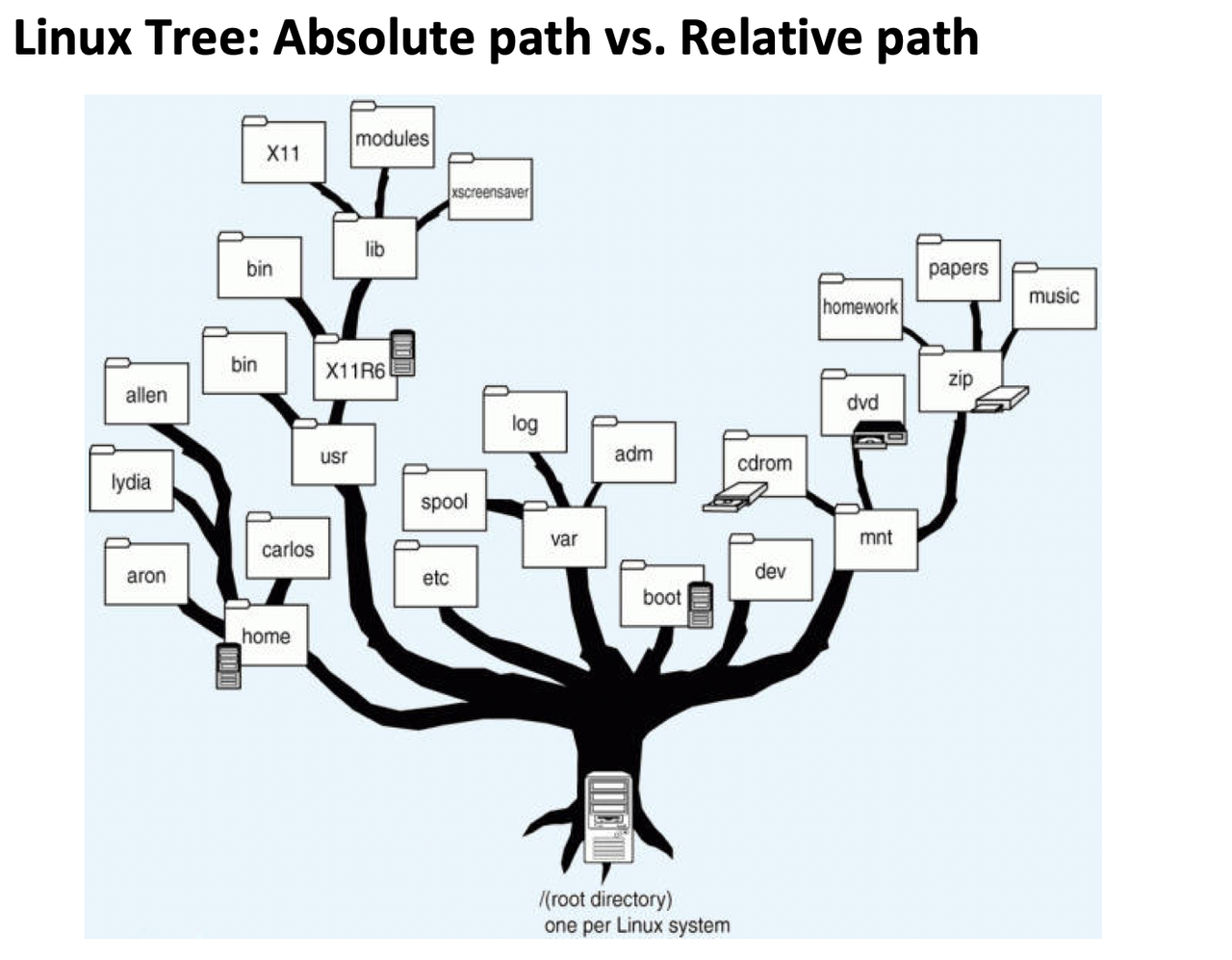
- 1️⃣ absolute path
- getting to that directory starting by the root of the tree
- so it always starts with
/ bc you start with the root
- 👀 to go to
x11in absolute path /usr/X11R6/lib/x11🛠️ if you want to reach directories close to root, use absolute
- 2️⃣ relative path
- getting to that directory starting from where I am
- recommended to start relative path with
./ ./means where I am nowbut
./is optional- 👀 If I am in
usr ./X11R6/lib/x11X11R6/lib/x11is also possible- 🛠️ if you want to reach directories close to yourself, use relative
- 🛠️ use the path that is better to your performance
✔️ Four standard symbols in linux
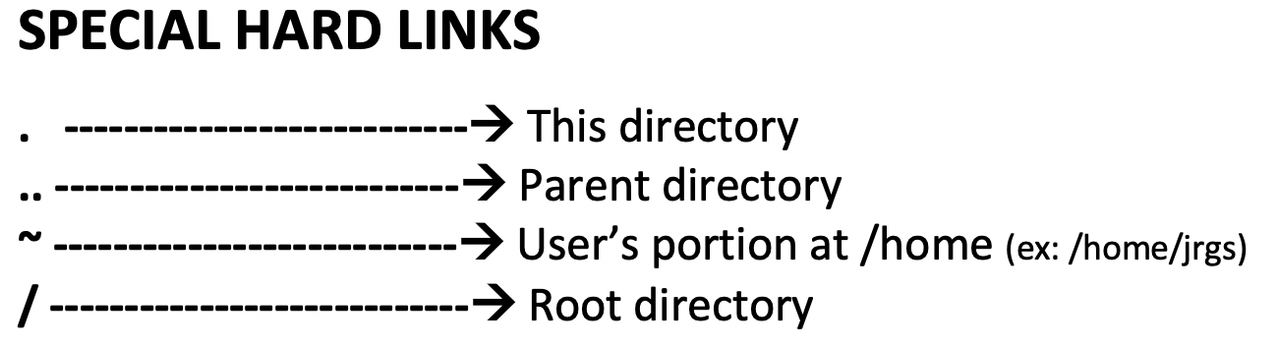
./: where I am now..: reach my parent branch, the branch I come from, one step down in the tree- 👀 If I am in
x11, and I want to go tousr, do../../..or./../../..
- 👀 If I am in
~:/home/personal/: root
✔️ We can create a hard link
- hard link
@=/mnt/dvd- when we associate a path to a symbol
- hardlink: a different name for the same thing
- an extra name of smth
- we can create hardlinks for anything
1
2
Cesar is called cesar and borja
create a hard link to cesar ➡️ borja
- 👀
/: hardlink for the root - 👀
~: hardlink for/home/shpl - 👀
.: hardlink for all directories I have visited 👀
..: hardlink for all the directories that have children- 🆚 hard links only exist in linux
- so in linux, one file can have 20 names!
1
2
3
4
5
6
7
8
9
10
11
- There is a file with two names
- you move one of those names to a hidden place
- and somebody deletes the other name,
- did the file disappear?
- No, you can still access it from the hidden name

- 👍🏻 when we create a hardlink
- we are protecting the file
- bc even if somebody deletes the file
- I can access it with the other name
✔️ How to delete a file forever in Linux
- The only way of deleting the file forever in linux
- is to delete all hardlinks
1
2
3
4
5
❓ When can you recover the deleted file?

- when you had a hardlink to that file
- 👍🏻 so you can recover deleted files
- by finding hardlinks in linux
✔️ One file has one inode number
- all the hardlink of a file
- have the same inode number
as the file is the same
- one file can have several hardlinks
- one file can have one inode number ❓❓❓❓❓❓❓❓❓❓❓❓❓❓❓
1
2
3
4
5
6
7
❓ How to recover files in Linux?
- find pieces of the file in harddisk with inode number
- get the hardlink of the file
- then with the hardlink access the file

❓ How to recover files in harddisk?
- finding in the harddisk with same inode number
- create wierd hardlinks
- and moving them to other directories
- protect the files
- 👀 put passwords in music directory
1
2
3
4
5
6
7
8
9
10
❓ Two ways of protecting a branch in Linux

1. visit the file
- bc then the file will have hardlink . and the filename
- that is why linux visits all the branches when it boots

2. create sub-branch inside the branch
- that branch becomes parent
- so will also have hardlink ..
- enter the directory and create empty files inside
✔️ When the branch is deleted, hardlinks stay
- If you remove the branch
lib - but the branch
libhad sub directoriesx11 - but to get to
x11, you still have to go through.. - even if you delete parent directory,
- the hard link of sub directory will not change!
✔️ In Linux, directory is the same as file
- hardlinks can be created to directories and files
- directory is a file with a type
directory - directory means container of other things
✅
✅
✅
This post is licensed under CC BY 4.0 by the author.