5.5 Install linux in VM
✅ Installation
- every release have same hardware requirements
- 🆚 flavors require different hardware requirements
- If you do not have the hardware requirements, change the flavor⭕️, not the release ❌
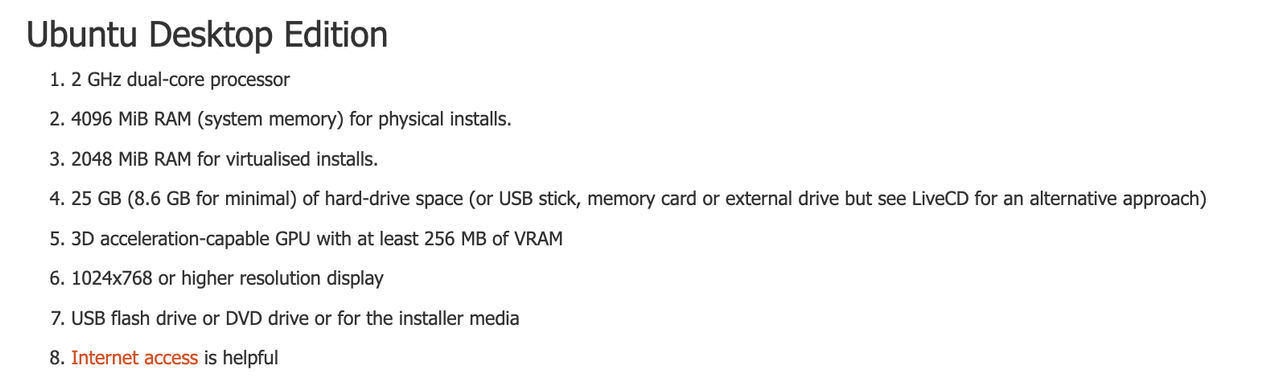
- (1) two cores
- (2) If you want to install Ubuntu in RM ➡️ minimum 4GB
(3) If you want to install Ubuntu in VM ➡️ minimum 2GB, recommended 4GB
- (4) 25GB of harddrive
- (4) 8.6GB of harddive is minimum for flavor
"L"ubuntu - (5) 3D accerleration is mandatory
(5) 256MB of Video RAM is necessary if you want to use linux in graphic mode
- 💊 use linux in command mode
- for ubuntu experts, use in command mode
- for standard users, use
"L"ubuntu or "X"ubuntuif you have problems with grpahic
- (6) High resolution, must have
SVGA if possible,
VM SVGA- 1️⃣ But when I choose
VM SVGAthe VM does not work, and theisomight not boot - bc the
SVGAis asking for too much resources from my RM - the RM is boycotting the VM
- if my RM has less than
512MB(in order to give half256MBto the VM) - I will have this problem
- 💊 still, you need to give
SVGAin order to use Ubuntu 💊 so give
Vbox SVGA, instead ofVM SVGA- 2️⃣ if
Vbox SVGAstill does not work - give
Vbox VGA - but you will not see the graphics of ubuntu
- 💊 but, still you can control linux with command mode
- 👉🏻 that is why many ubuntu consoles do not offer graphic mode at all
💊 use commands!
- (8) give internet
- use
BridgeorNATed NAT: one IP address for bothBridge: each RM, VM has their own IP address
1
2
3
4
5
6
7
8
❓ What happends if you are in bridge
and you are in Clara Del Rey and you have problem with internet
you lack IP address
and you try to install ubuntu
you machine is not connected to internet

- then change to NAT
- then you can share the NAT
- (9) If you are in systems that are limited in resources
- create VM in internal disk ⭕️
- do not created VM in external disk ❌
- you can create it internally, then deploy it on external
📌 Create VM for Linux
✔️ RAM
- When while creating the VM
- When we install OS that require SWAP
- give miminum RAM
- so that SWAP can also be minimum
- later, after running and you see that you need more RAM, SWAP
- then allocate more RAM
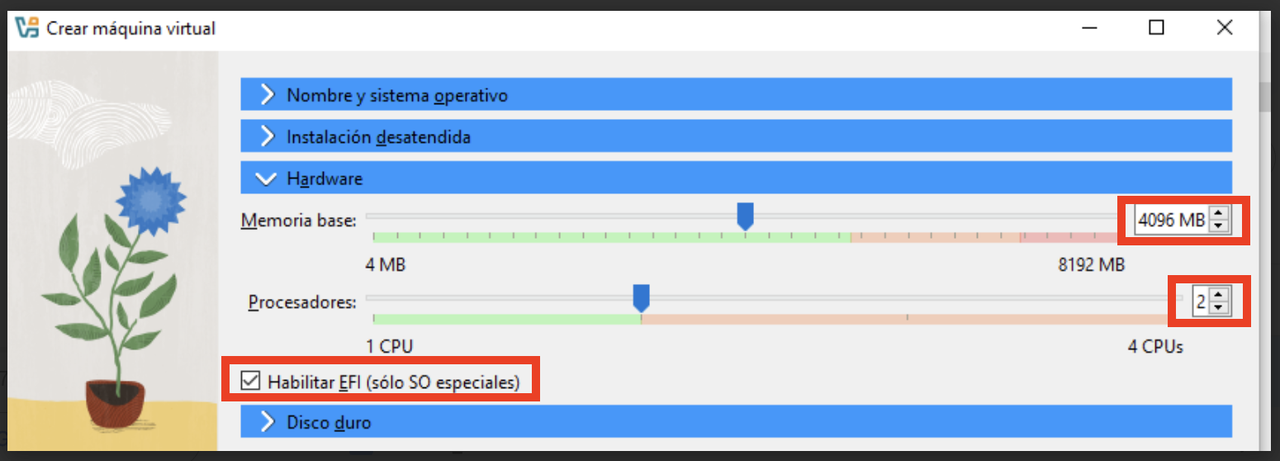
✔️ EFI
- for Linux EFI is not mandatory
- but if we decide to tick EFI
- linux will create its own
/boot/efipartition - if possible, tick EFI
- 👍🏻 EFI will enable stronger booting
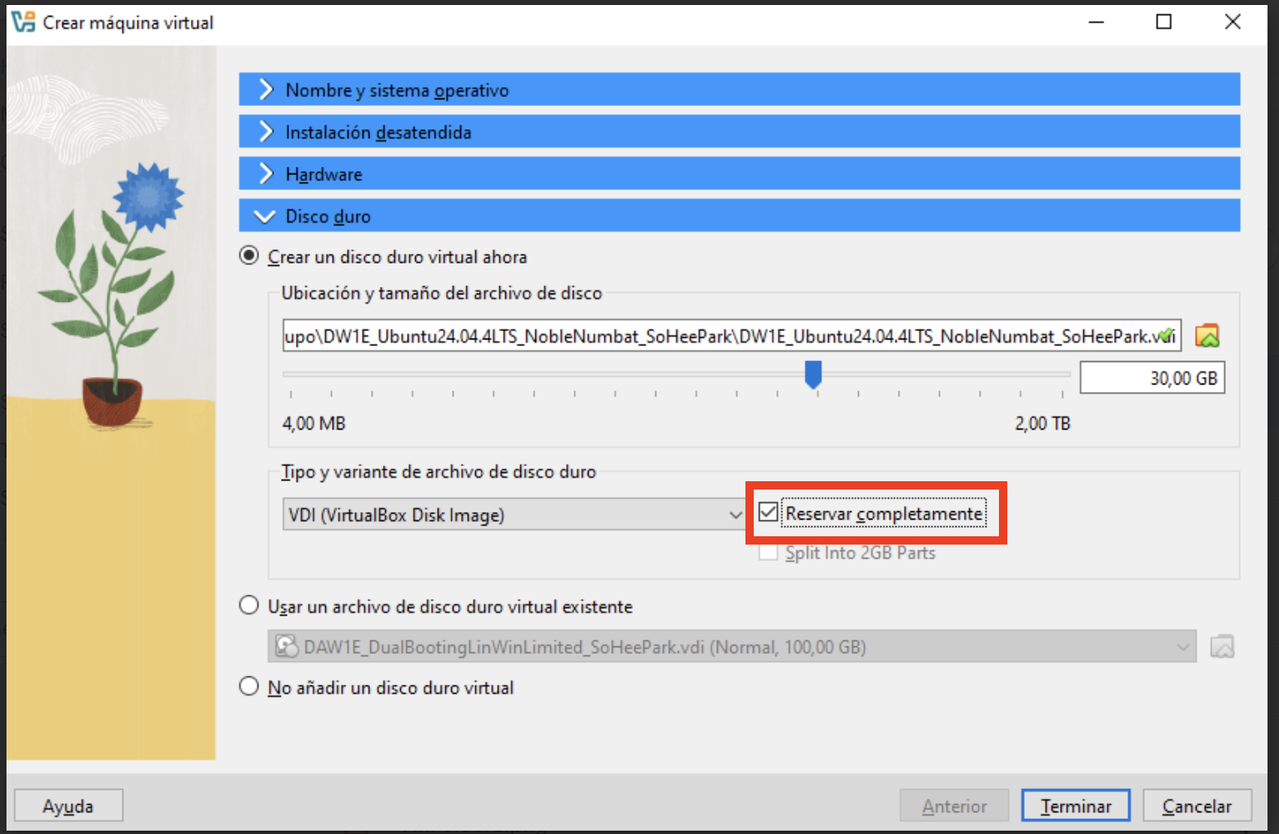
✔️ Harddisk
- if you give
dynamic, thedviwill be only2MB - so when installing OS, tick on
Reservar complementamente always give full size of harddisk
- ⚠️ why you have
Disk Full error - 1️⃣ when you do not have
30GBon your RM - 💊 delete some files and apps and make some space on your harddisk
- 2️⃣ if the format of my harddisk is FAT32, as maximum is
4GB - 💊 harddisk should be formatted to exFAT, with backup
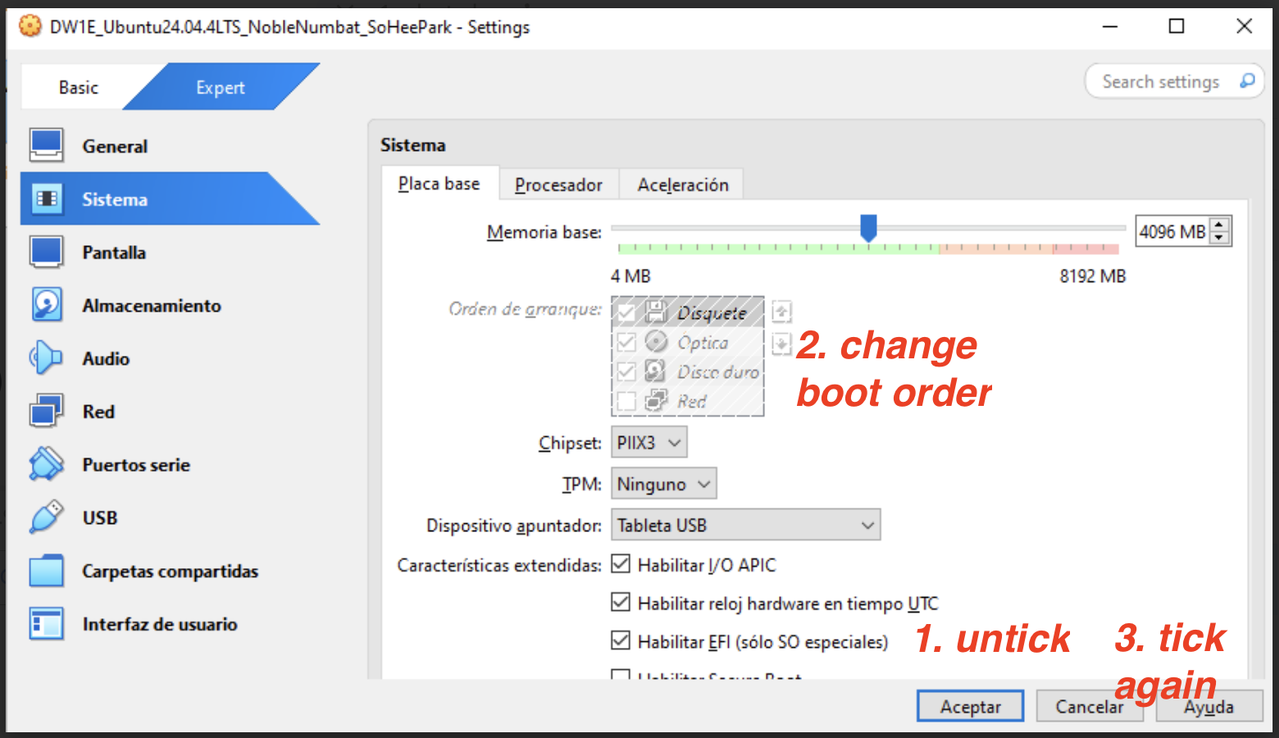
✔️ Boot order
- If you tick EFI
- boot order cannot be modified in VirtualBox
you can modify in the EFI
- 💊 If you want to change this
- uncheck
EFIone second - then change boot order
- then again tick
EFI
✔️ I/O APIC
- we should tick bc
- we have two cores
- and we are 64 bits
✔️ Secure boot
- never use Secure boot for linux
- it will not boot linux
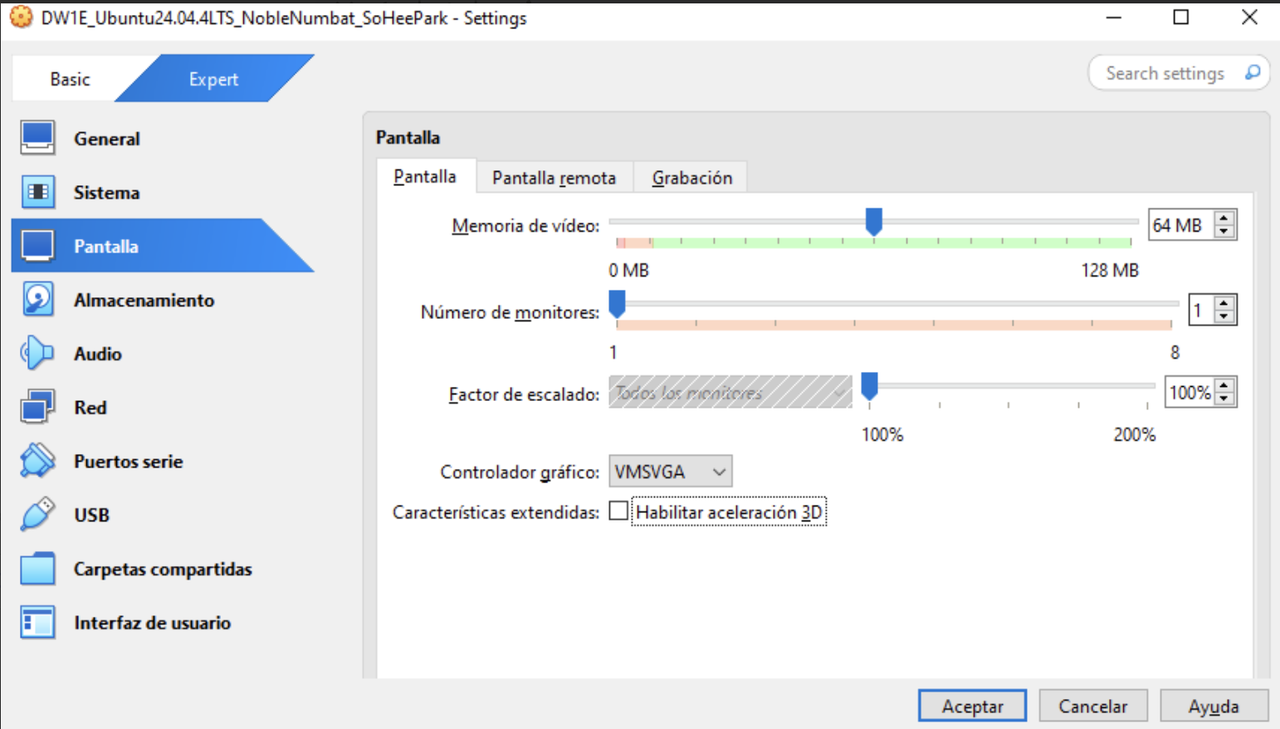
✔️ Memoria de video
- give half, if you cannot give 256GB
✔️ VideoRAM
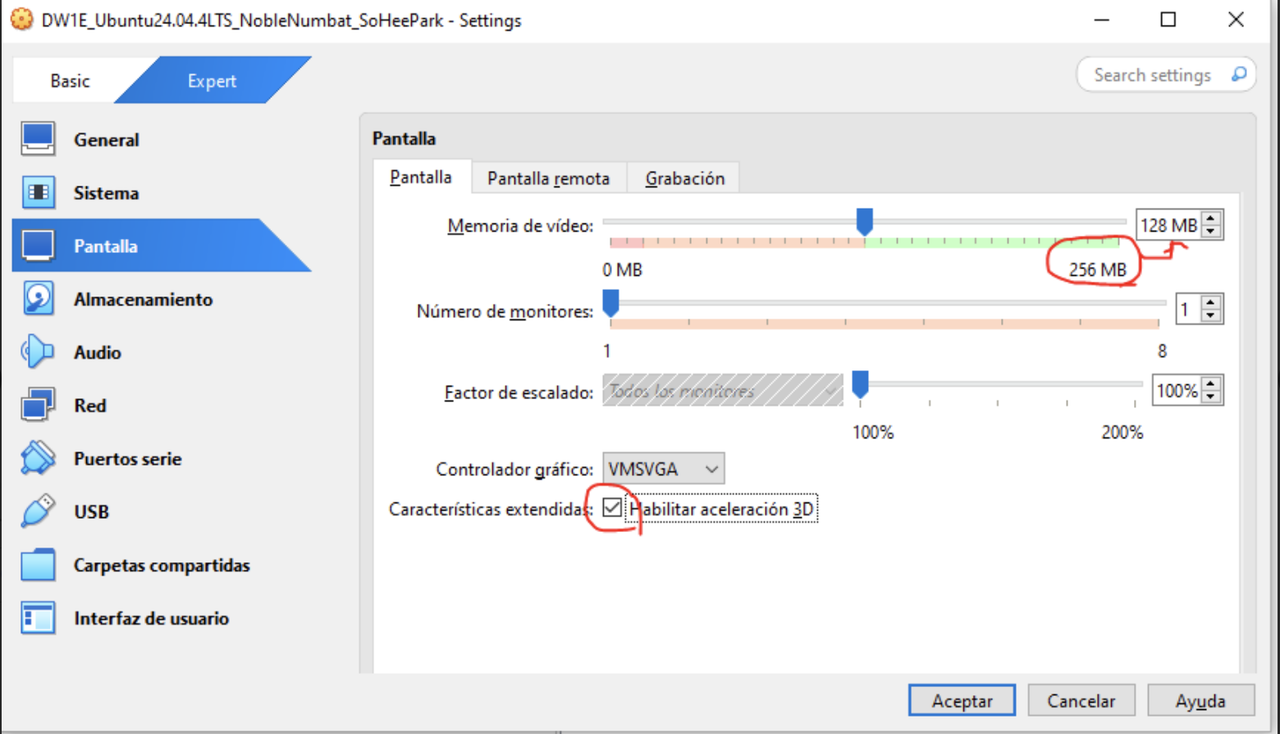
- In systems that need 3D acceleration as requirement like Ubuntu,
- when you enable 3D acceleration
- the system adds more video RAM
- it takes the video RAM from the SWAP
- the system dedicates part of the harddisk to the RAM, for the video RAM ➡️ creates
video SWAP - thanks to the SWAP ➡️ creates
video SWAP we can give more to the VM
- 👉🏻 3D on
- 👉🏻 when videoRAM increases double with video SWAP from
128MBto256MB - 👉🏻 allocate half of videoRAM
- always play along with graphics
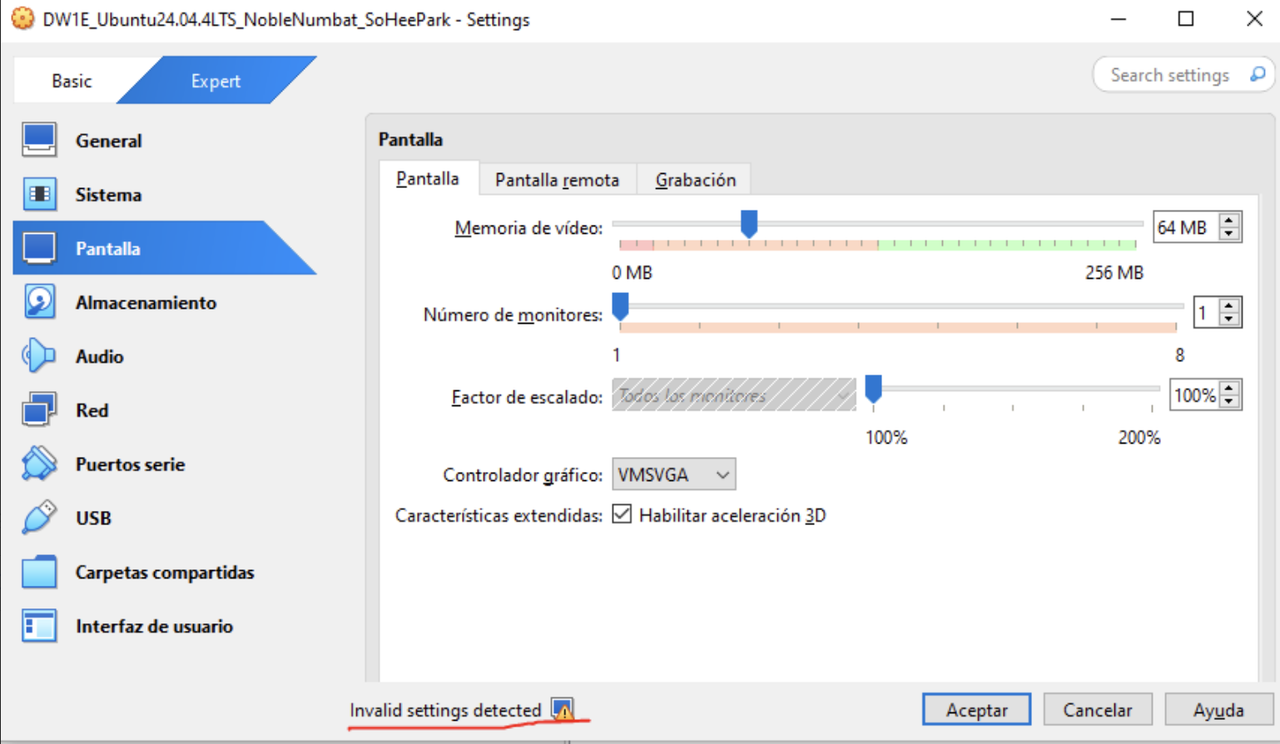
- to avoid invalid settings
- try to satisfy as many requirements as possible
✔️ Shared folders
- linux has a good system for shared folders
- activate shared folders with USB
- so for linux, create shared folders
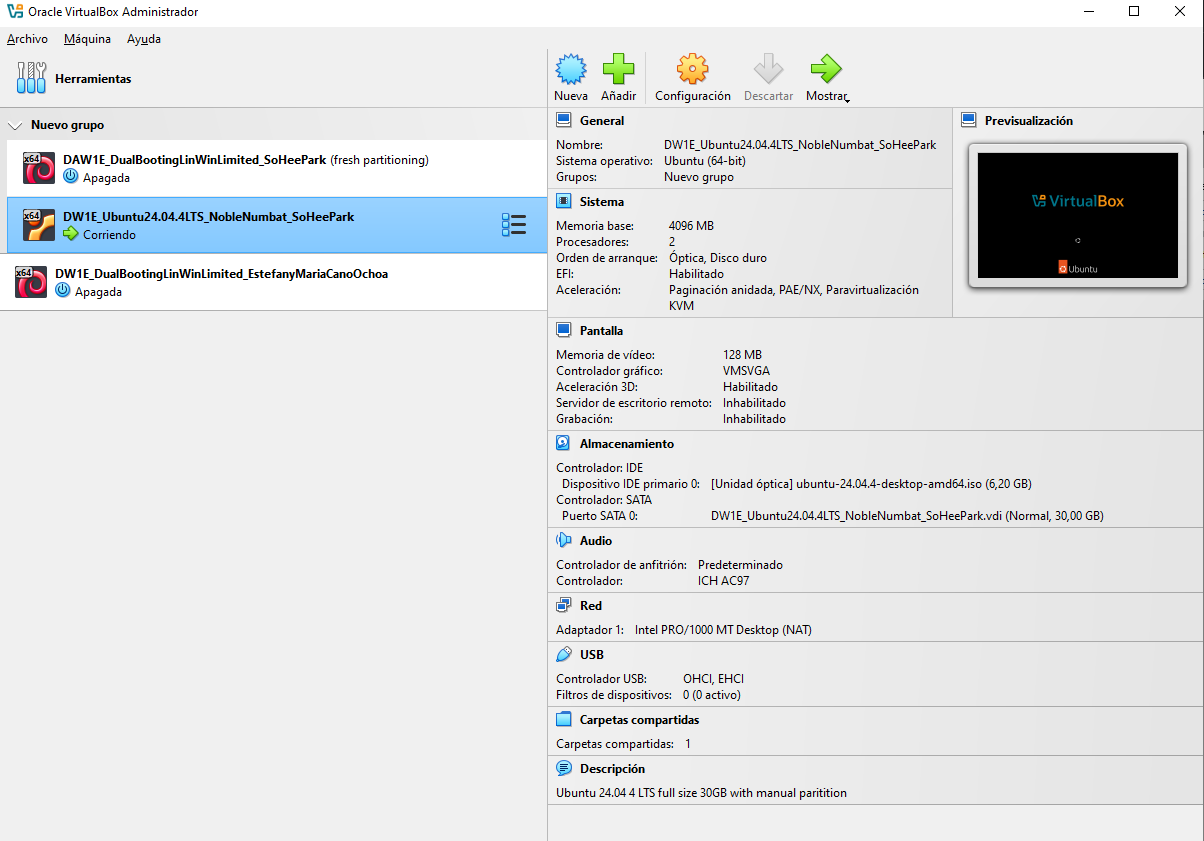
✔️ Attach a details screen
- After setting a virtual machine
- always ITIL to attach a details screen
✅ Final summary of the VM
This post is licensed under CC BY 4.0 by the author.