4.10-14 Save State/Grouping/Optimization/Clone/Delete
✅ 4.10 Save State
- when you save-state of the machine
- that state is only saved on the host where you saved it(host1)
- so in host2, the VM will not have the same state
✅ 4.11 Grouping
- strongly recommended to group VM by functionality/
💡 How to group VMs
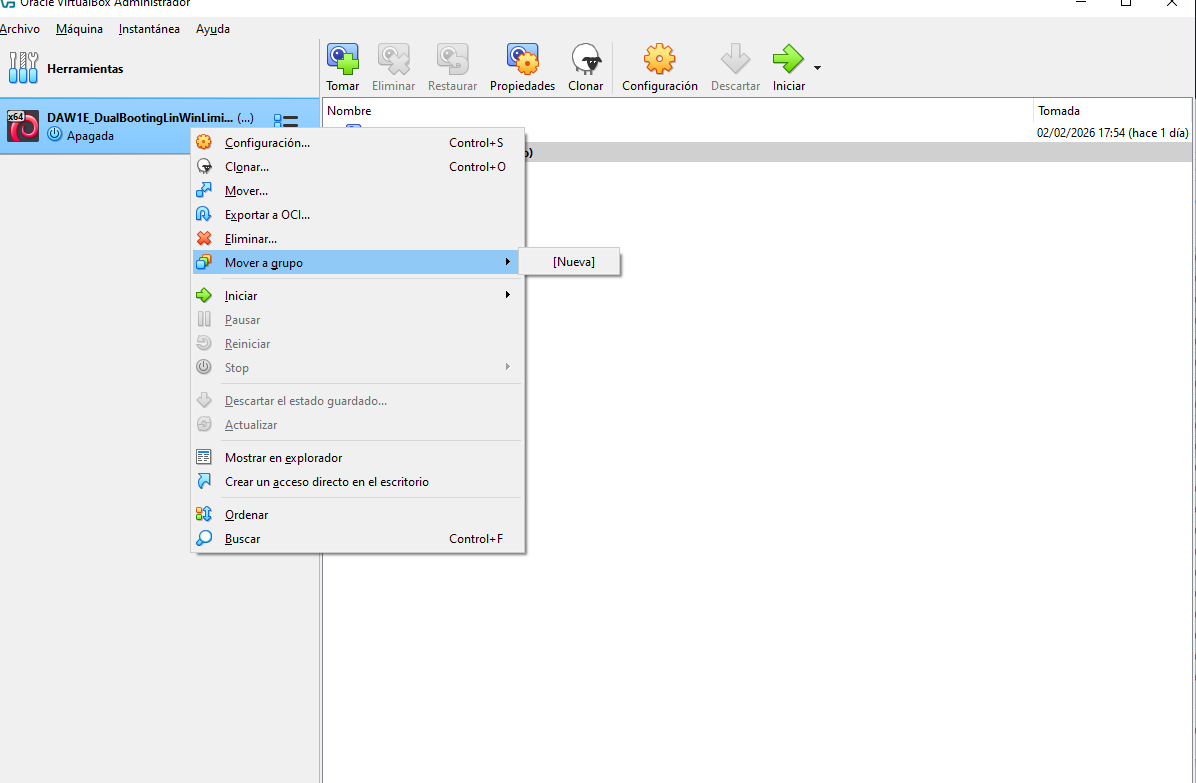
- 1️⃣
Right click on scaffold > move to group - 2️⃣ click on
new, create a new group - 3️⃣ Group looks like a label
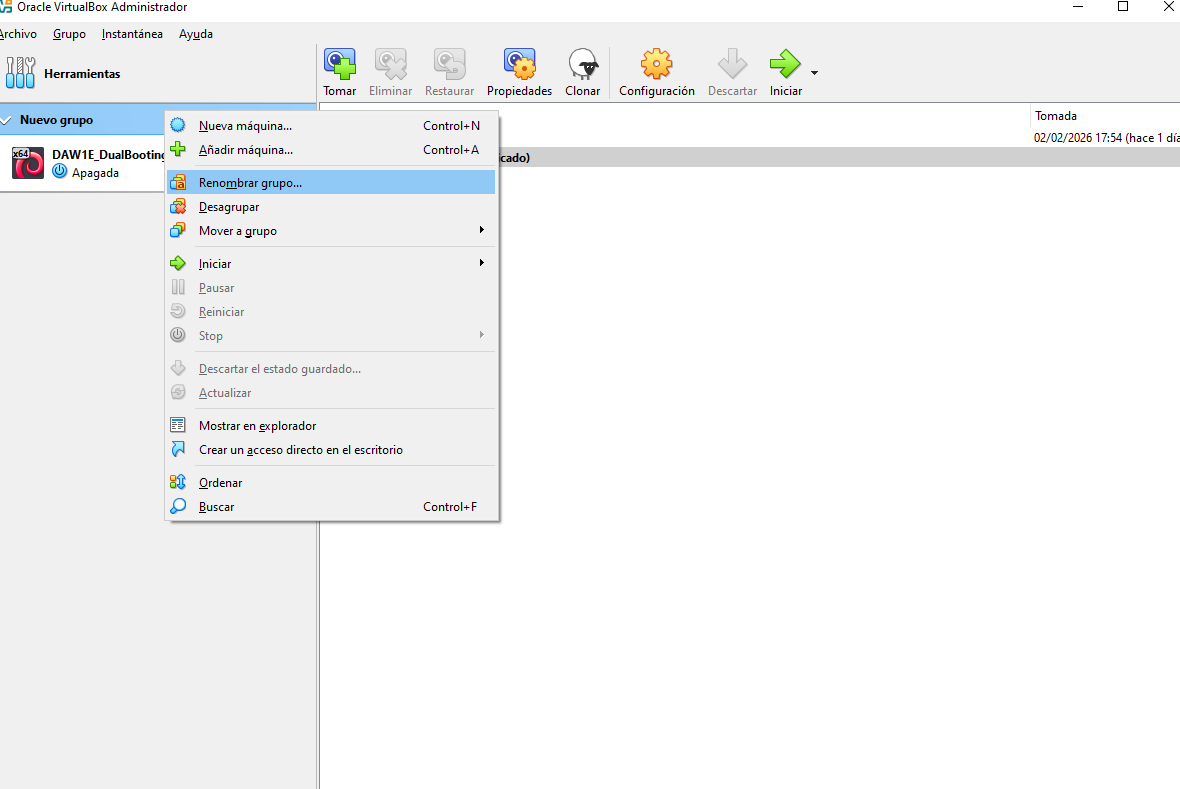
- 4️⃣
right click on the label > change name - 5️⃣ If you want to join more machines into that group, right click and select the group you want to add to
✅ 4.12 Optimization: Guest Additions
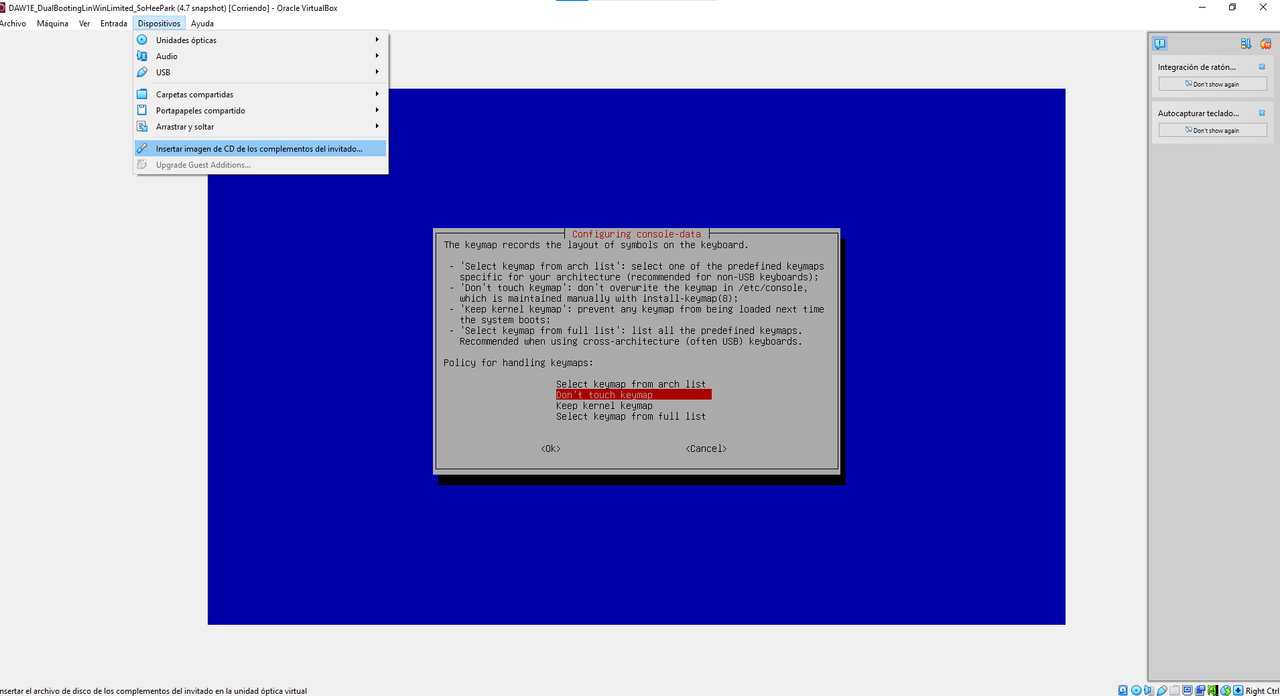
- Guest Additions is an extension to optimize the VM
- GA is an optimizer
- use when OS is installed
- Guest Additions are specific for each OS
- so if you have several OS, you will have to install GA several times
👀
GA for windows,GA for linux…- GA do not help the OS ❌
- GA help the VM to work perfectly ⭕️
💡 Where GA is used
- for bidirectionality between host and guest
- shared folder for USBs
for maximizing VM, to enable
Host+F- If you install GA for windows, you will be able to use bidirectionality, shared folder, maximize VM…
- but not in linux
- you will have to install
GA for Linuxif you want to use these functions in Linux
💡 How to install GA
- 1️⃣ The machine should be running
- 2️⃣
Devices > Insert Imagen... - GA is an
iso, imagen de CD - 3️⃣ GA is an
isofile, so it will override the previousisothat you had - that is why we should use GA when we have already installed the
iso - 4️⃣ In the windows of the VM, go to
este equipoin the VM, and double click on theGA iso file
💡 Windows and GA
- In windows, the
isofile, as it is a CD - it will appear in
este equipo - and you will have to double click on the GA
✅ 4.13 Clone a VM
- Purpose of cloning: to clone a VM and give a totally different use ⭕️
- clones are not created for different moments of a VM ❌
- that would be possible with snapshots
🛠️ sometimes clones are used for testing
- clone will be created in the same folder
- will appear as another scaffold
- the name of clone will be the same, but ending with
clonar
💡 How to clone a VM
- 1️⃣ Machine off
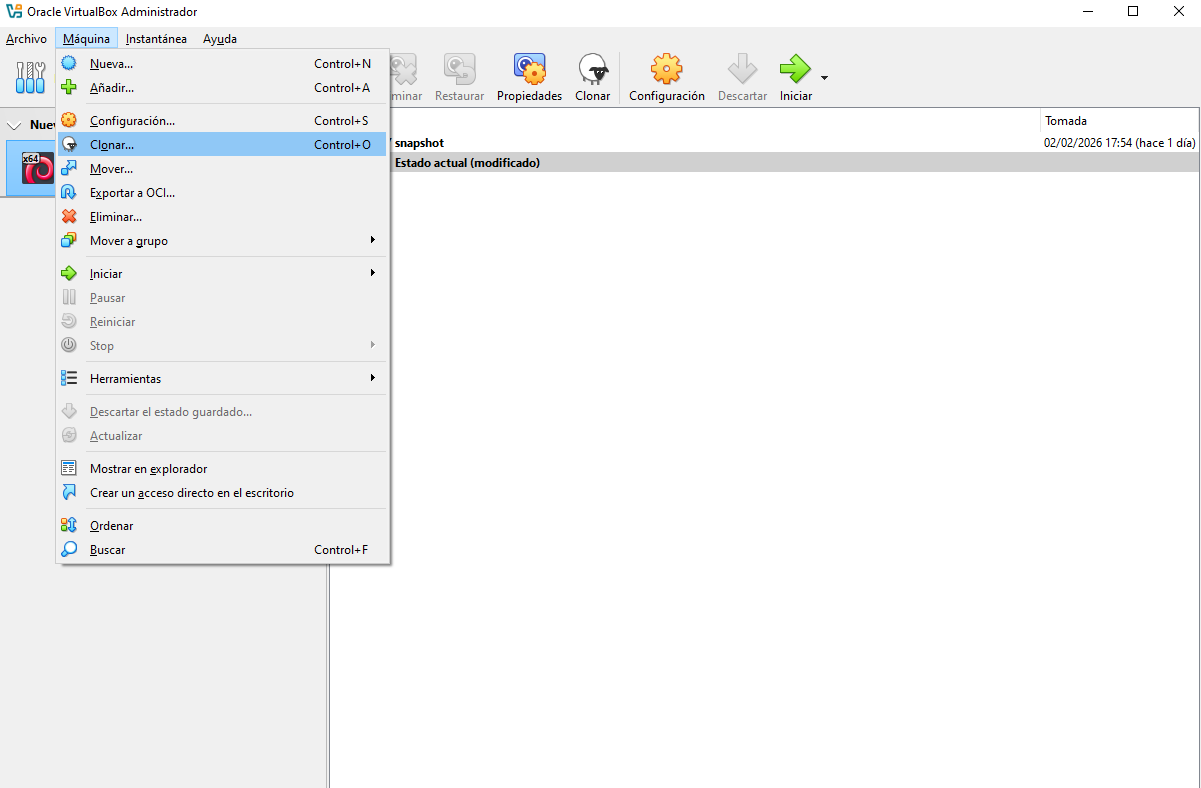
- 2️⃣
maquina > clonar
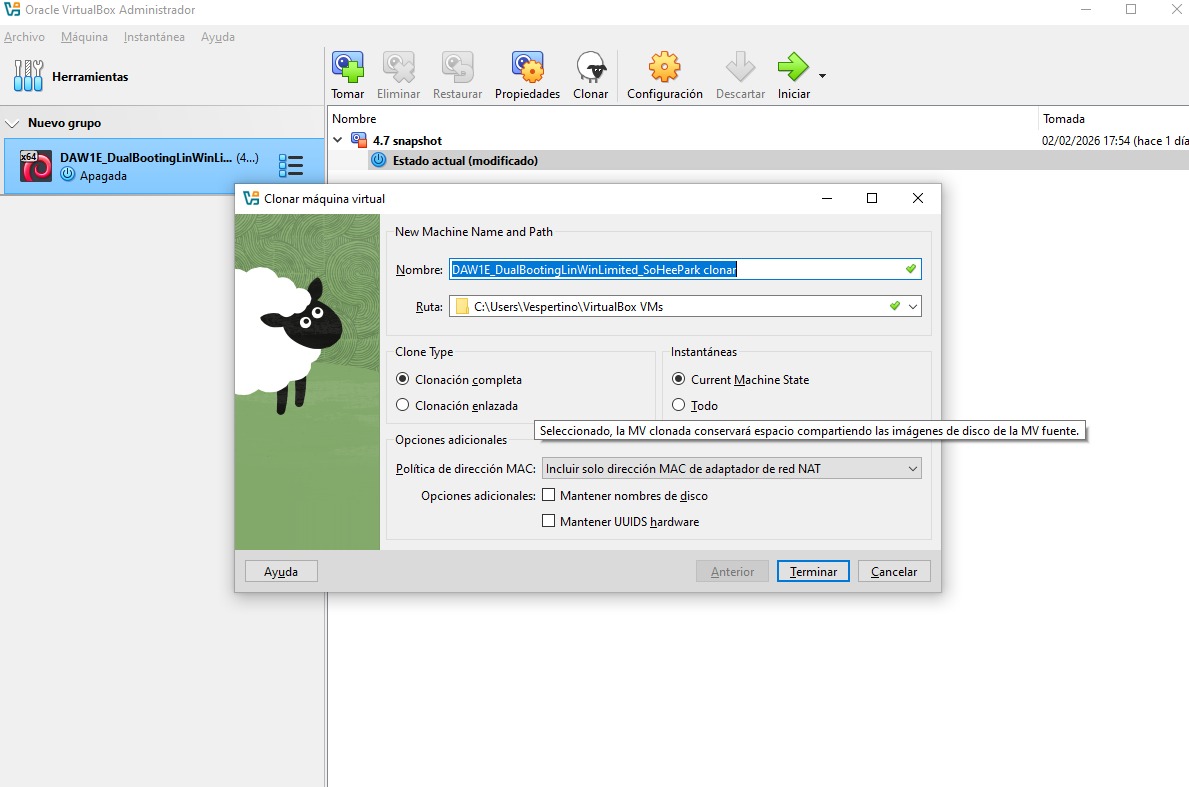
- 3️⃣ choose complete clone or linked clone
- 4️⃣ choose if you want same or different MAC address for clone
⭐️ Complete clone
- copy the
vdito anothervdi - the clone will have the same size as the original
- 👀 If host1 has RAM 100, host 2 will have RAM 100
and RAMs will be different
- 👎🏻 take up more resources, 200GB of RAM
⭐️ Linked clone
- same
vdifor both clones but different goals
- 👍🏻 Take up less space
- clone is lighter
- 👎🏻 clone is not independent from the original machine
- the original machine always have to be there acting
- 🛠️ used for forking
- ⭐️ Forking: from the same machine, getting separate evolutions
⭐️ MAC address for original and host
- if MAC address is the same,
- you are sharing the internet
- if MAC address is differnt
- you have different connection to the internet
✅ 4.14 How to delete a VM
- 1️⃣ Machine off
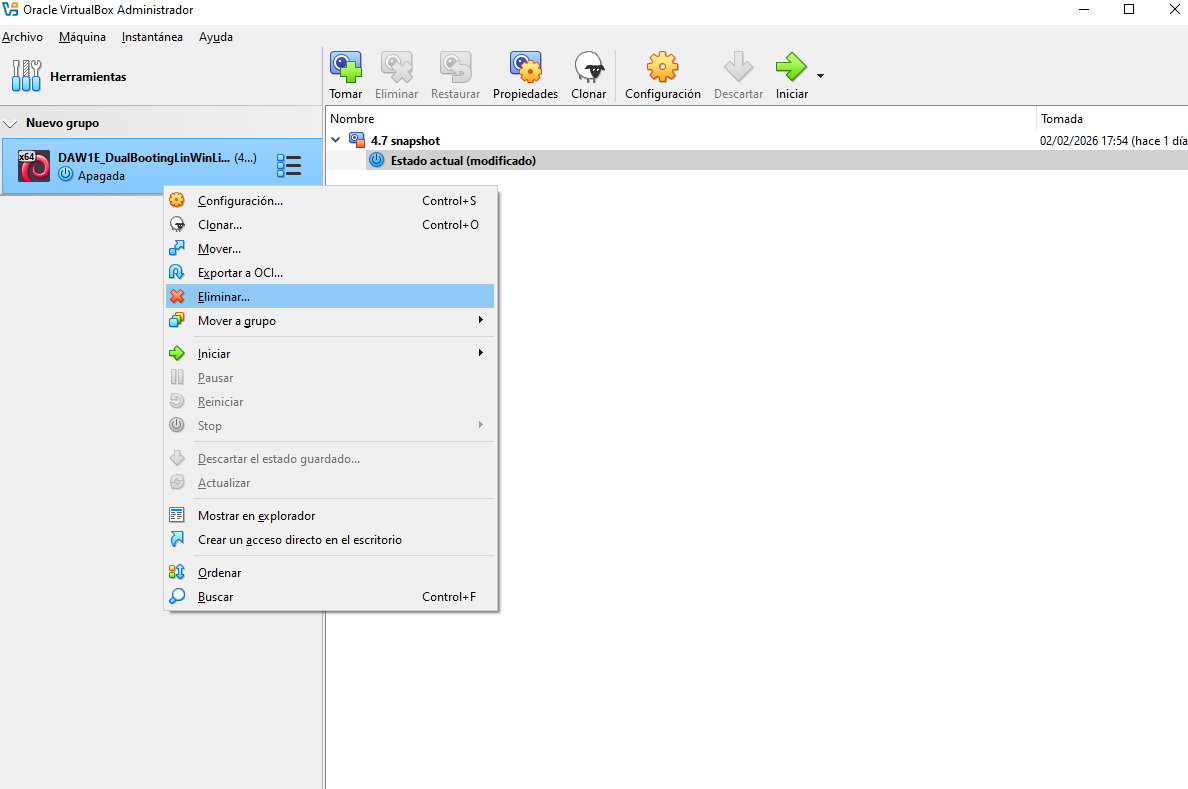
- 2️⃣
rightclick > eliminar - 3️⃣ Now you have two options
- (1) solo borrar
- (2) eliminar todos los archivos
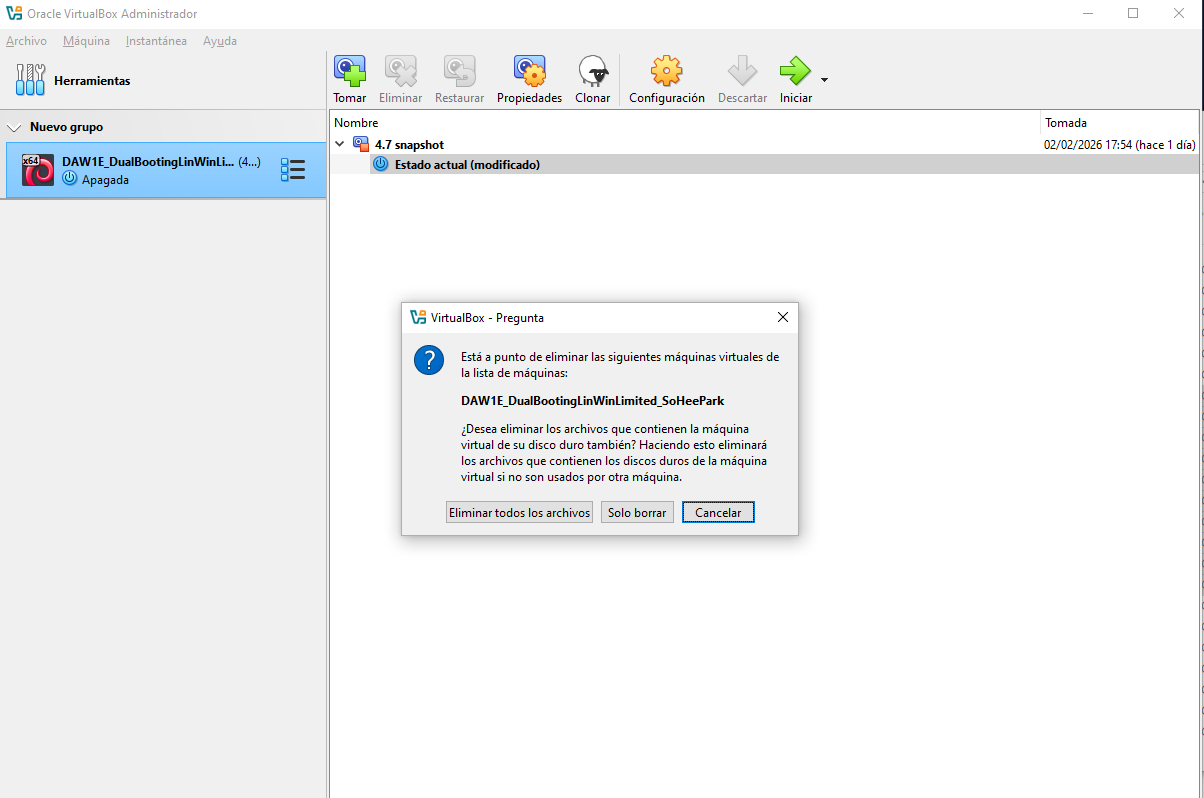
⭐️ solo borrar
- delete the scaffold
- you delete the access to the machine
- but the machine is still there
- you can create a new scaffold one day if you want to use it again
⭐️ Delete all, eliminar todos los archivos
- you are deleting/losing everything
- you cannot bring it back
no trace left on the trash
- ❓ If I delete my complete clone, will I lose my original VM?
- no
I deleted the
vdiof the clone- ❓ If I delete my linked clone, will I lose my original VM?
- Yes! They are linked
- so when you create a linked clone, make sure everyone knows
- that nobody deletes your original VM
- and add/change the name of the linked clone, “this is a linked clone VM”
or put all the linked clone VMs in the “no delete” group
- ❓ But if I want to delete my linked clone?
- you can delete with
solo borrar - but linked clones will stay linked forever
This post is licensed under CC BY 4.0 by the author.