4.1 Visualization
✅ Definitions
- ✔️ Host: anfilcion, the real machine
if we use VM, my host can behave differently
✔️ Guest: Invitado, the virtual machine
- ✔️ Virtual Machine: a software/program that simulates different scenarios
- In order to use a virtual machine,
- need to install a
virtualization softwareon thehost over the virtualization software, we can install different OS, different applications…
before:
- my computer
- OS
- applications
after:
- my computer
- virtualization SW
- several OS, several applications…
- ❌❌❌ We are not partitioning our real machine(host) ❌❌❌
- creating a Virtual Machine is not partitioning
- we do not physically have lin-win installed
- we are having the real machine behave as different OS
- my host only has a windows, but it can bahave as mac, linux…
✅ Virtualization Software
☑️ Hyper-V
- comes with Windows
- 👎🏻 can only use Hyper-V when the host is windows
- guest can be whatever
- so you can simulate as whatever
- 👍🏻 when you simulate windows as guest, perfect
- 👎🏻 when you simulate mac/linux(not windows) can be slow
☑️ Virtual Box
- was created by Linux
- free of charge
- 👍🏻 host can be whatever
- 👍🏻 guest can also be whatever
- 👍🏻 very well structured software
☑️ VM Ware
- 👎🏻 need to pay
- 👎🏻 bit complicated, organized in packages, interconnected between them
🆚 Benchmark of three softwares
- comparison: benchmark
Benchmark: https://www.janbasktraining.com/blog/comprehensive-study-hyper-v-vs-vmware-vs-virtualbox/
💡 Activate VM before using virtualization
- apart from downloading the SW
- you also need to activate/enable in your BIOS
🛠️ Use of Virtual Machines
1️⃣ VM for departments
- Each department in a company is managed/controlled by a VM
- 👀 If you work in HR,
- you connect to HR virtual machine
- let you enable remote working
- each VM has different strucutre for each department
- no physical department exist
2️⃣ Cloud computing
- computacion en la nube
- cloud: remote computer
✔️ Three types of clouding
IAAS: Infrastucture as a Serviceyou use only the hardware of the contracted company
PAAS: Platform as a Serviceyou use hardware + development tools of the contracted company
SAAS: Service as a Service- you use everything of the contracted company
- take your business to the cloud
✔️ Clouds are public
- they are shared by several companies
- Clouds do not have one computer dedicated to each customer
- Customers use the same computer,
but they use a VM, specified to them
- A has Jam factory, contract VM SAAS company
- B has Car factory, contract VM SAAS company
- C has Pillow factory, contract VM SAAS company
- VM SAAS company has only one computer
- when A tries to acccess, it shows A VM
- when B tries to acccess, it shows B VM, car factory
✅ Download Virtual Box
- (1) Go to Oracle VirtualBox webpage
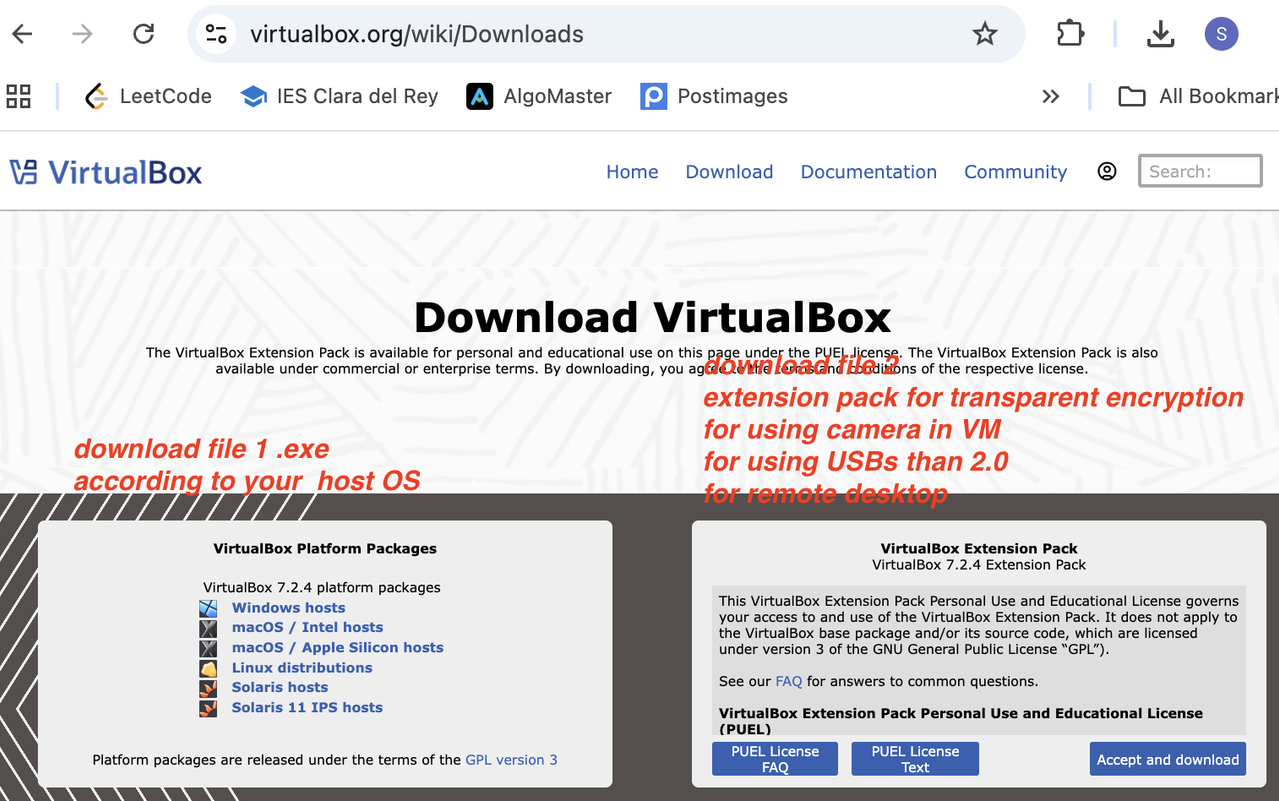
(2) Download two files 1:
.exe- choose what OS your host has ➡️ download
VirtualBox.exe - then run as administrator, do a right click ⭕️
- do not double click, this will run as normal mode ❌
- After running as admin, run in next mode
- Do not modify anything! Modifying will alter the file structures
- choose what OS your host has ➡️ download
(2) Download two files 2: extension pack
- extension pack:
vbox-extpack - special package
for transparent encryption, for encrypting your disk - also for using for
camerain your VM - also for using
USB 2.0(fast USB) - also for remote desktop
- extension pack:
1
2
SoHee cannot use her USB 3.0 in her VM. Why?
- she did not install the extension pack
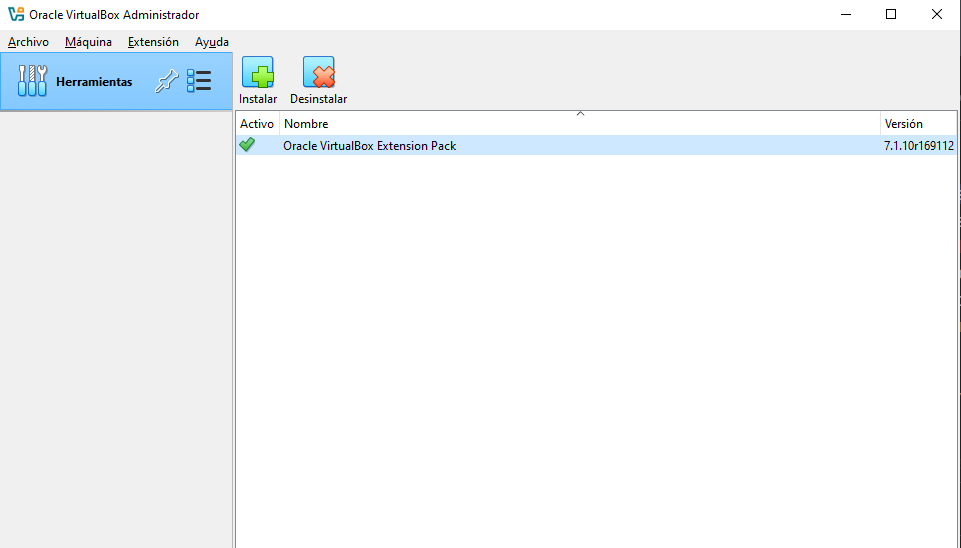
- (3) Link the extension pack to the
.exe - In order to link, join the extension pack to the VM
file➡️tools➡️extensions- then click on install
- and click on the green check
- extension pack always has a green check
This post is licensed under CC BY 4.0 by the author.