3.9 Partition System
✅ Partitions schemes = drawing = design = outline
- There are two types of partition systems
- MBR partition system
- GPT
1️⃣ MBR partition system
Master Boot Record
- ✔️ MBR design is valid only until 2TB(⭐️ exam question)
- So if you have more than 2TB, you cannot use MBR
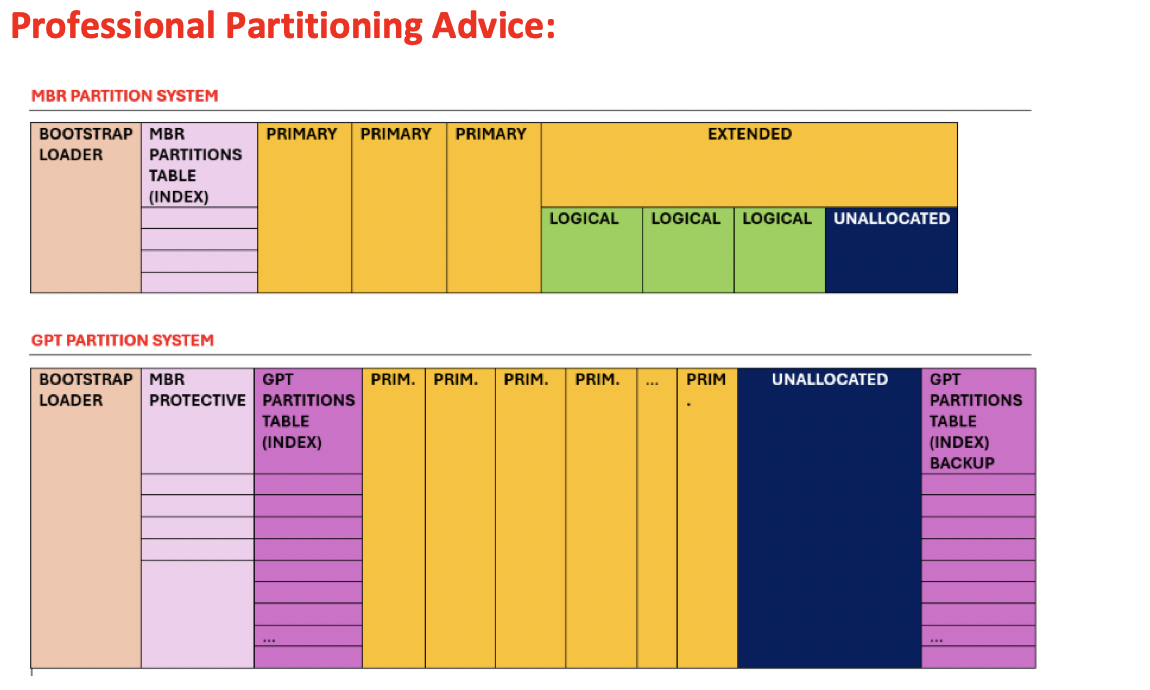
✔️ MBR can mean two designs
- (1) max of 4 primary
- (2) 3 primary and umbrella of several logical partitions
- design of partitions (1) with a maximum of 4 Primary partitions
- we say that a disk is MBR if there is a max of 4 primary partitions
- you can have 1 primary, 2, 3, 4, but not 5
⚠️ MBR system can only boot up to 4 OS if you use design type (1)
- It is also MBR when (2) you have 3 primary and one umbrealla(extended, with many logical partitions inside)
- 3p + E(xL)
- when you want to create more than 4 partitions
- 👎🏻 but in logical partitions, the OS is only for testing, cannot install OS for booting
- ⚠️ MBR system can only boot up to 3 OS if you use design type (2)
1
2
3
4
❓ A company wants to create 7 partitions.
Can you create 7 partitions with a MBR schema?

- create 3p + umbrella, extended with 4 logical partitions
1
2
3
4
5
6
7
8
9
❓ A company wants
- windows 7 bootable
- windows 8 bootable
- windows 9 bootable
- windows 10 bootable
- windows 11 bootable.
Can we use MBR?

- No. MBR will only let up to 4 bootable OS.
☑️ The unallocated space in MBR
- Unallocated space: space/partition for future, always recommended to have some U
- In MBR, we cannot add Unallocated space in MBR design (1)
- So, if you want unallocated space, you cannot use design (1), never not after the fourth primary partition
1️⃣
4P + Uwill not work ❌- So, if you want unallocated space, you should choose design (2)
2️⃣
3P + U⭕️- If you are using the umbrealla, specifically in design (2)
- 3️⃣
3P + E(xL) + Uwill also not work ❌ - the unallocated partition cannot be outside the umbrella ❌
- 💊 So, place it inside the umbrella
- 4️⃣
3P + E(xL + U)⭕️
1
2
3
4
5
6
7
8
❓ SoHee has a computer of HD of 2TB.
There are 300GB free at the end, but she cannot reach them. It is unreachable.
Why is this problem happening?

- Maybe, possibility 1: she has a MBR with 4 primary partitions
- possibility 2: she has a MBR with 3 primary partitions, then an umbrella, then the unallocated space.

💊 Solution: place the unallocated space inside the umbrella
☑️ How to place the unallocated space inside the umbrella
- Extend/Expand the umbrella
- Move the unallocated space inside the extended umbrella
- ⚠️ If you do not expand the umbrella, the other logical partitions will be more 꽉 껴서, will suffer
- 💊 G Part Ed can help you expand the umbrella
- 💊 Mini tool partition wizard can also help umbrella extend, and move the partitions
☑️ MBR Table
- If you want to activate the unallocated partition at the end,
- does not make sense to activate all the partition in the middle ❌
- you should be able to jump to the unallocated partition ⭕️
- 💊 Use an index: help to jump to the partition you want
MBR table: index in the MBR design
- MBR table: for the HD for finding for the partition
- This MBR table(index) is stored in Unit 0
- Bootstrap loader: The menu for the user selecting the OS is also in Unit 0
- the menu is for choosing the OS that the user wants to boot
☑️ Final recap MBR Design
1
2
3
4
5
Bootstraploader (Unit0)
➕
MBR table (Unit0)
➕
4P || 3P+U || 3P+E(xL) || 3P + E(xL + U)
1
2
3
4
5
6
7
8
9
10
11
12
❓ If I destroy the Unit 0 what happens?

- You will not lose the data, will not lose partition
- You will lose the index and the menu
- You will not be able to boot the disk

- But as you do not have the index, you cannot jump within partitions
- to recover the information
- you need to go track by track, sector by sector
- looking for transitions, and trying to recover information

- That is why it takes so long to recover a HD
1
2
3
❓ What is inside the Unit 0 in MBR?
- bootstrap loader
- MBR table
2️⃣ GPT partition system
GUID Partition Table
GUID: Global Unique Identifier
- ✔️ Structure of GPT:
128 Por127 P + U 128 P: you can have up to 128 bootable OS127 P + U: you can have up to 128 bootable OS and Unallocated partition- In GPT, there is no umbrella ❌
- there is no extended partition ❌
- there is no logical partition ❌
- as you do not need more partitions. You already have 128 partitions!
☑️ Advantages of GPT
- ✔️ Data, OS for testing has fast access
- as in GPT, there is no logical partition
- even testing data, OS goes to primary partition
- 👍🏻 So faster data access than MBR
everything is in primary
- ✔️ Maximum capacity of GPT
- ⭐️ Maximum of 9.4 ZetaBytes(18 zeros)
9.4 * 10^18 Bytesthis is the future of the disks
- ✔️ GPT lasts long
- data lasts forever
☑️ Disadvantages of GPT
- 👎🏻 too many indexes, index would be too big
- 👎🏻 too many bootstrap loader menu, you have 128 menus
- both index and bootstrap is stored in Unit 0
- 👎🏻 Unit 0 also has to be huge
- 👎🏻 There is a higher possibility of damaging the Unit 0, as it is so big
👎🏻 GPT disk is more fragile in an accident
- Users at the end always choose the typical OS, 맨날 쓰던거만 씀
- so too many index, too big menu
☑️ Solution of GPT
- 👎🏻 GPT Unit 0 is too big
💊 Add a copy of the Unit 0 at the end of the last plate of the disk
- 👍🏻 This copy can recover, protect the disk
- 👎🏻 But you are wasting a lot of space in the disk, as the same content is duplicated
- and this Unit 0 is not a content for users
- 👎🏻 But if both Unit 0 and copy of Unit 0 is destroyed, almost impossible to recover the GPT
1
2
3
4
5
6
❓ What is worse, bootstrap loader error or partition table error?

An error in bootstrap loader is not that worrying. It is easy to solve.
An error in partition table, depends.
If one partition table is broken, we still have a copy
But if both partition tables are broken, we have a big problem.
☑️ MBR Protective
- for legacy BIOS
- a mini index for the only four first partitions
- no copy
☑️ Partition Table
- index for all the disks
- copy created
☑️ Final recap GPT Design
1
2
3
4
5
6
7
8
9
Bootstraploader, menu (Unit0)
➕
MBR protective, mini index
➕
Partition Table, huge index
➕
128P || 127P + U
➕
Copy of the partition table
MBR 🆚 GPT
✔️ MBR:
- smaller but very well organized, inside umbrellas
- bit fragile, but recovery is possible
- easy to maintain the disk
- like a small but well organized house
✔️ GPT:
- like a huge palace with 128 suits
- easier to build, you do not have to worry about space/partition
- waste lots of space in the beggining and the end
- not so fragile, you have a copy of Unit 0
- but if you destroy both indexes, you do not have recovery tools, almost impossible to recover
- very difficult to maintain, too big
- has security problems bc of GUID
✔️ Conclusion:
- For now, MBR is more recommended, easier to maintain
- GPT is the future
✅ BIOS
- All HD are booted by the BIOS
- MBR is easier to boot
Booting a GPT is much more difficult to boot for the BIOS
- 🥵 For the legacy BIOS, booting GPT is extremly difficult
- When legacy BIOS tries to boot a GPT, it cannot pay attention to all the 127/128 partitions
- Legacy BIOS will only see the 4 first partitions
- other partitions will be unaccessible
- So, GPT disks have a mini index with only the 4 first partitions
- called MBR Protective, it is a way of protecting the BIOS
✅ GUID
- In GPT disks, each partition has an identifier
- haxadecimal identifier
- the identifier is unique in the world
- everytime you create a partition, the partition will have an identifier
- 👎🏻 If there is important information, a hacker might try to access it with the identifier
- In the dark web, ppl are starting to create records of identifiers of partition and their location
- huge security problems, very risky to save information
✅ Command for checking disk design
- How to check if my disk is MDR or GPT
Win + R > diskpart > list disk
- if it is a GPT, a
*will appear
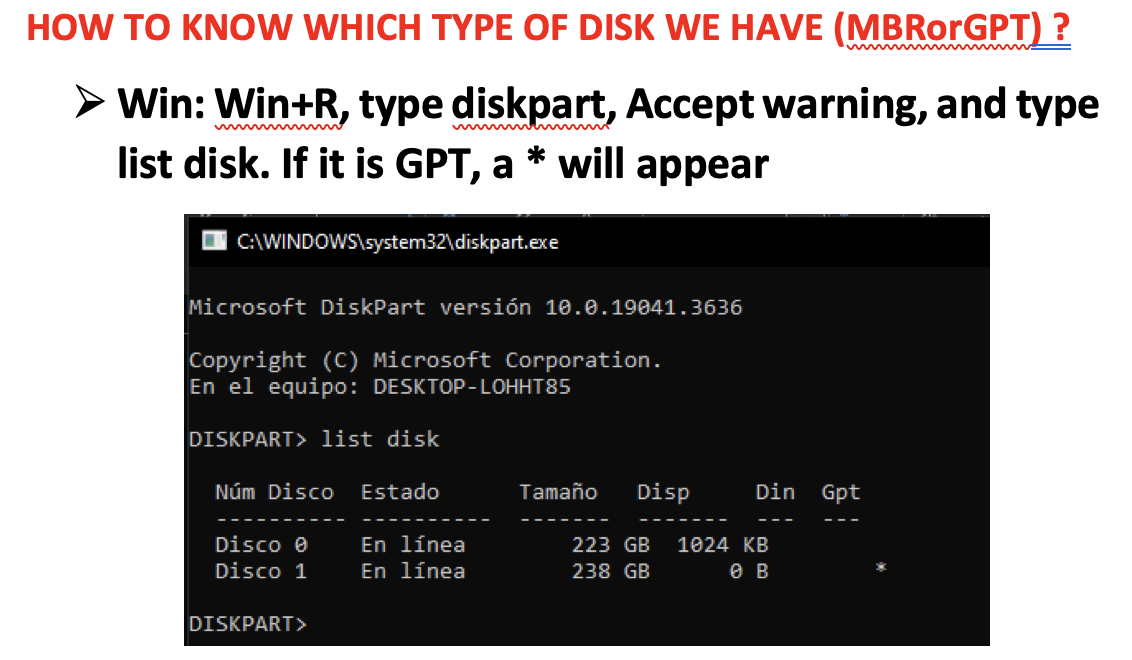
- Disk 0: disk /dev/sda (internal disk)
- Disk 1,2,3…: all external disks, USB, external SSD..
- if you see a star: disk is GPT
- if you do not see a star: MBR
1
2
3
4
5
6
7
8
9
10
11
12
13
14
15
16
17
18
❓ Can I create an umbrella in my internal disk, according to the picture above?
- Yes, as Disk 0 is a MBR.

❓ Can I create an umbrella in my external disk?
- No, Disk 1 is a GPT.

❓ Can I boot the last 5 versions of windows in my internal disk?
- No, as Disk 0 is MBR, I can only boot up to 4 OS.

❓ Which of the two disks have more physical protetion by default?
- Disk 1, GPT, as there is a copy of an index.

❓ UEFI BIOS could boot Disk 0, Disk 1 or both?
- Both, can boot both MBR, GPT.

❓ Legacy BIOS could boot Disk 0 complete, Disk 1 complete or both complete?
- Legacy BIOS can boot Disk 0 complete
- But, Legacy BIOS can NOT boot Disk 1(GPT) complete ❌
✅
1️⃣
2️⃣
3️⃣
4️⃣
- 1️⃣
- 2️⃣
- 3️⃣
- 4️⃣ 👍🏻 👎🏻
1
2
3
⭐️⭐️⭐️ EXAM ⭐️⭐️⭐️
❓
👉🏻
This post is licensed under CC BY 4.0 by the author.