3.2 32 or 64?
✅ 32 or 64 can mean two things
When we say
32 or 64, we can be talking about two things
1. The architecture of my motherboard
- factory settings of the motherboard
- unchangeable
- architecture of a system cannot be modified. ❌
2. Type of Operating System
- the OS can be 32 or 64 bits
- changeable
✅ The architecture of my motherboard
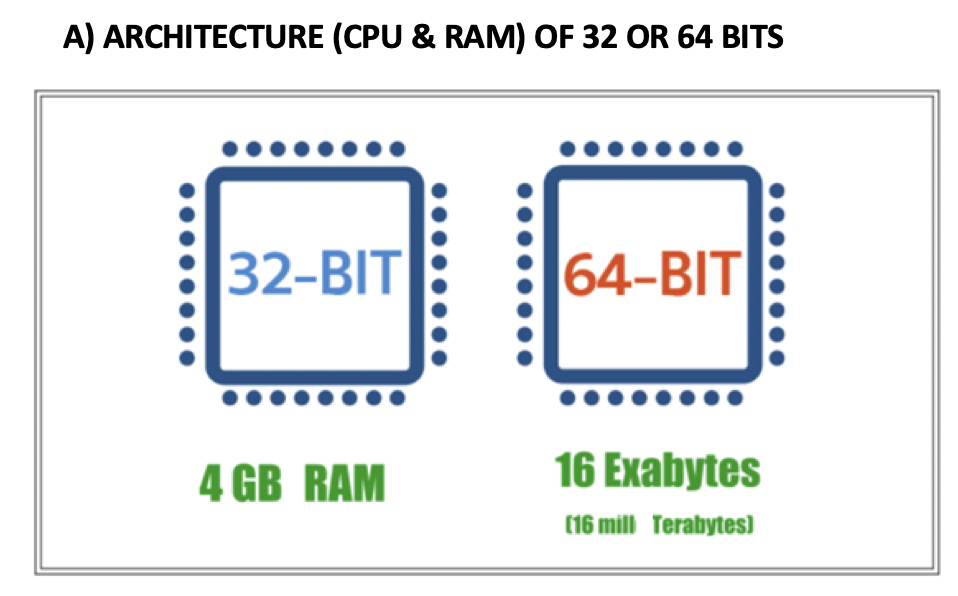
☑️ 32 bits architecture = x86
- We say that my architecture is
32 bitswhen all the buses transmit32 bitsin parallel - buses of the motherboard has 32 bits
- Parallel means: at the same time
- like a 32 lanes highway
✔️ RAM in x86
- If you have
x-86, your RAM maximum would be<=4GB - If the conections(bus) have 32 bits,
- you have
2 to the power to 32positions on the RAM 2 to the power to 32= 4GB of RAM- ends with 8F,
FFFFFFFF NOT file size, RAM size would be 4GB ❌
- ⚠️ If you insert more than 4GB, your RAM will not be read at all! 😱
✔️ Name of 32 bits architecture, x86
- The technical name of 32 bits architecture is called x86
- following the name of the first 32 bits architecture computer, intel 8086
✔️ What uses the x86 motherboard system?
- these days personal computers use
x64 - but many servers still keep the achitecture
x86
☑️ 64 bits architecture = x64
- We say that my architecture is
64 bitswhen all the buses transmit64 bitsin parallel
✔️ Name of 64 bits, x64
- The technical name of 64 bits architecture is x64 systems
- Some ppl also called
x64asx86-64, but recommentx64
✔️ Check before downloading
- When you download an application,
- you need to know if your computer is a
x86orx64 from 2010, all computers are 64 bits
- ✔️ RAM in x64
- you have 64 bits for everything
- you have
2 to the power to 64positions on the RAM 2 to the power to 64= 16Exa of RAM- end in 16F,
FFFFFFFFFFFFFF - this does not exist, but RAM would be 16Exa RAM
1
2
3
4
5
❓ Can a system with x86 read more than 4GB?
👉🏻 NO.

❓ I have a computer, when I install smth bigger than 4GB, I have an error. WHy?
👉🏻 Bc I my motherboard is using x86
✅ How to know the architecture of your motherboard
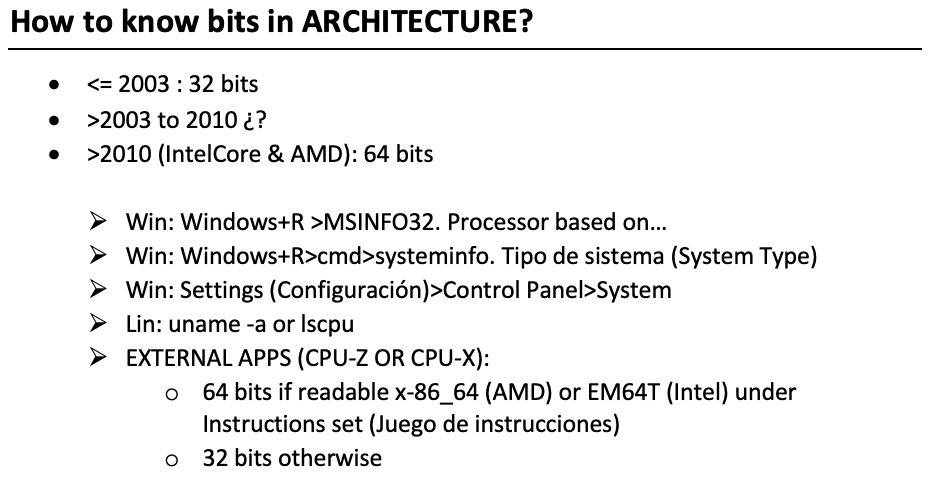
1️⃣ First way: MSINFO 32
1
windows + R > MSINFO 32 > System Type(Tipo de sistema)
- when you download, your tool should have the same architecture
- the tool of
CPU-Z for System Analysis and Monitoring Windows systems - this tool detects your architecture
2️⃣ Second way: systeminfo
1
Win+R > cmd > systeminfo
systeminfo- capture the terminal
✅ Type of Operating system
- modifiable
- applications inside the HDD
☑️ 32bits
- We say that
OS has 32 bitsif the Apps/Files of the Harddisk(secondary memory) have a maximum ofs4GB - apps, files will have max of 4GB, not the RAM ❌
☑️ 64bits
- We say that OS has 64 bits if the Apps of the Harddisk(secondary memory) can have a maximum of
16Exa Bytes
✅ How to check my OS
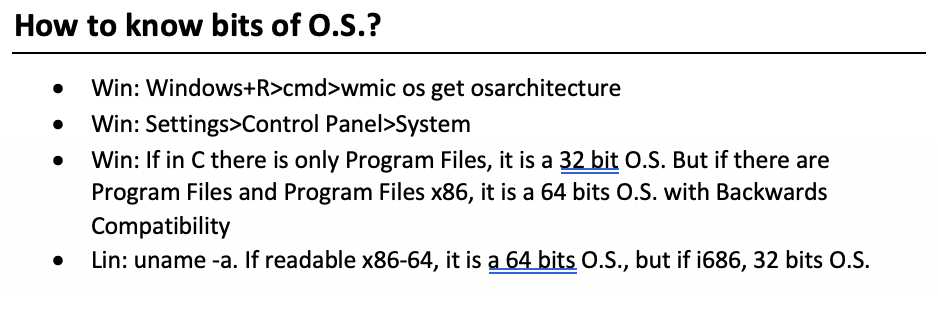
1️⃣ on terminal: wmic os get osarchitecture
1
Win+R > cmd > wmic os get osarchitecture
windows key+R- type
cmd - in the terminal that appears, write
wmic os get osarchitecture
2️⃣ visually
1
You could also do the visual way: Open windows explorer > This PC (Este Equipo) Double Click C
- open
windows explorer - go to
this pc - double click on C
- if you see two folders, your OS has
64bits- one folder than ends in
x86, it will be for files less than 4GB - and the other folder would be for bigger apps
- one folder than ends in
if you see one folder, your OS has
32bits- ⭐️ Review
- in a
32bits OS, you see only one program files - in a
64bits OS, you see two program files- program files: for bigger applications, bigger than 4GB
- program files(x86): for files that are less or equals to than 4GB
1
2
3
❓ Can I have a windows 11 or 32 bits?
👉🏻 Yes you can. All OS have 32 and 64 bits versions, including windows 11
- so, you can choose.
- the bigger the architecture, bigger the OS,
- 64 bit versions are always better, faster, more efficient
1
2
3
4
5
6
❓Do we have all version, version 32 and version 64 of all OS?

- windows 8 had 32, 64 versions, windows 11 also have both versions...
- all OS have two versions
- do not think that 32 bit OS is old and bad, its just another version of OS
- and also, 64bit OS does not mean new and good, just choose the OS version that suits your computer.
This post is licensed under CC BY 4.0 by the author.