3.14 Fred's case solutions
📌 Fred’s case
- BIOS legacy
- you can have MBR 3P+E
- or GPT with 4P with MBR protective
✅ First step: backup
- always take
C:\Users\<user>\downloadsC:\Users\<user>\documentsC:\Users\<user>\desktopC:\Users\<user>\musicC:\Users\<user>\videoC:\Users\<user>\pictures
- use a backup engine(backup application)
- copy the six folders
- after formating the computer
- and save that backup again in the same exact place as it was
- 👍🏻 avoid broken links
✅ Disk: MBR or GPT
- MBR
- cannot be GPT because we need more than 4 partitions
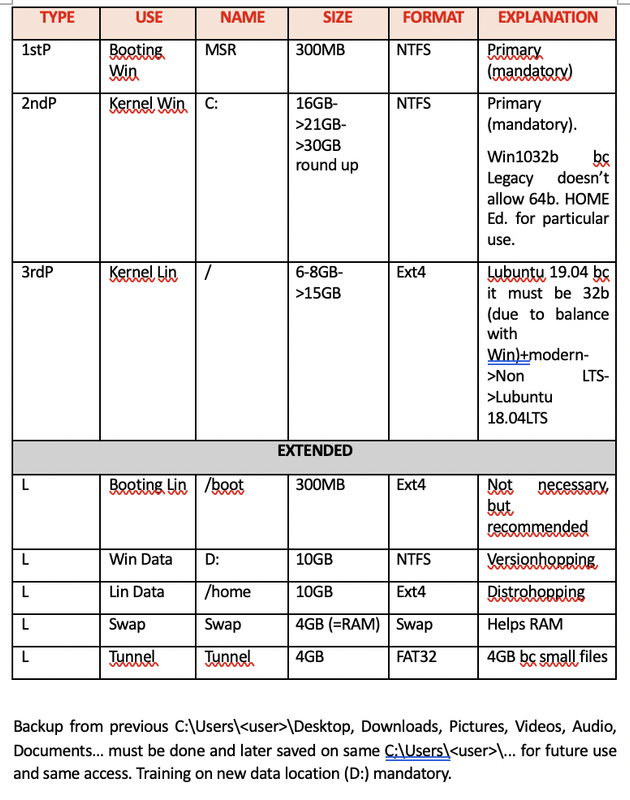
✅ How many, size, type of partitions
☑️ Primary partitions
- ✔️ 1P: MSR
- booting for windows
- size: 300MB
NTFS
- ✔️ 2P: C
- kernel for windows
- size: 16GB(min) + 5GB(extra for updates) + 9GB(extra to keep previous files)
- = 30GB(for Windows 10 Home 32 bits)
- NTFS
❓ why primary: bc windows like primary
- also Fred had files in
C:/Users/<user>/downloads, desktop, music, documents... - so add 9GB extra for keeping things in the location where they are
1
2
3
4
5
6
7
❓ Why do we have to give extra 9GB above 21GB in kernel for windows?
- bc normal users save their files on desktop,
- we are going to change the C format, but we should keep their old files
- so in order to keep the previous files where it was

➡️ old files stay inside C:/
- and you can convince the user to save data in D:/
- ✔️ 3P: / (root)
- linux kernel
- we give primary to linux so linux and windows are balanced
- It could be logical, but as we have a primary, we can store it here
- Lubuntu 18.04
- size: 8-10GB + 5GB(for updates) = 15GB
- format: ext4
☑️ Extended partitions
size of extended partition: 100GB - 300MB - 30GB - 15GB = 54GB and 700MB
- ✔️ L1: /boot
- in terms of partition orders, give booting the first partition available
- 300MB
ext4
- ✔️ L2: D
- data for windows
- version hopping
- 10GB
NTFS
- ✔️ L3: /home
- data for linux
- distro hopping
- 10GB
ext4
- ✔️ L4: SWAP
- in terms of partition orders, order does not matter
4GB
- ✔️ L5: Tunneling
- 4GB
- tunnels, if they are for small files, recommended 4GB
- FAT32
☑️ Unallocated
- ❓ Why is unallocated inside the umbrella?
- bc if it is outside, we cannot reach it
MBR can only have up to 3P + E
- size: rest of the disk, do
100GB - all the partition size before - format: no format, this is unallocated
✅ OS
- ✔️ Windows 10
- Home edition
OS 32 bit
- ✔️ Lubuntu version, year
- as windows is 32 bits, linux should also be 32 bits
- the latest lubuntu with 32 bits is 1904, but this version does not have technical support
- so the answer is lubuntu is 18.04 LTS
📌 Perfect schema for computer with legacy
📌 How to expand to a bigger disk, more than 100GB
- If I have 1TB, instead of 100GB
and I want to install Windows 10 32bits
- ✔️ P1: MSR
size: stay as 300MB
- ✔️ P2: C for kernel
size: stay as 30GB
- ✔️ P3: linux kernel
- size: 15GB
👉🏻 booting, kernel size stay
- ✔️ L1: linux boot
size: stay 300MB
- ✔️ L2: windows data
size: give more, maybe 300GB
- ✔️ L3: linux data
- size: give more, maybe 500GB
give more than linux if you are going to use more linux than windows
- ✔️ L4: SWAP
RAM is 4, so SWAP should be 4GB
- ✔️ L5: tunnel
- size: give more if you really use it
- size: 4GB
This post is licensed under CC BY 4.0 by the author.