3.11 Combination of the BIOS Legacy/UEFI booting and MBR/GPT
💡 Some confusing concepts
- Disk Partitions system: MBR, GPT
- File system: FAT32, NTFS, ext2/3/4, exFAT
- Booting system: BIOS Legacy, UEFI
💡 Combo summary
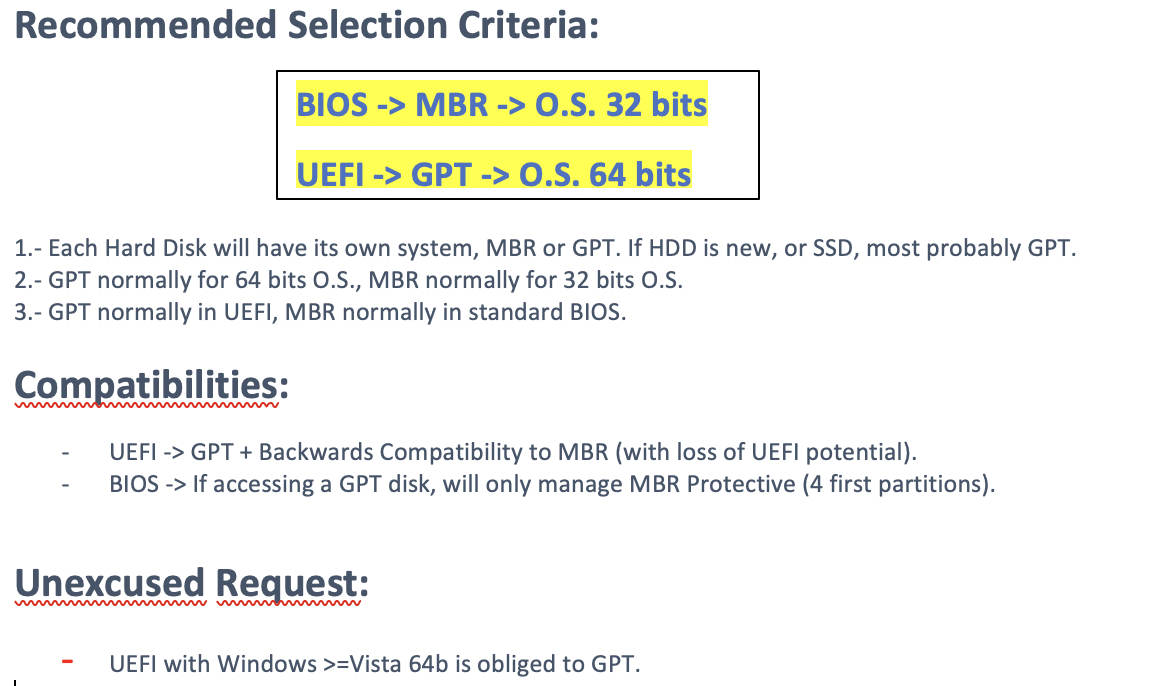
BIOS Legacy ❤️ MBR ❤️ 32bits OS
- Legacy is like a shy teacher
- MBR Disk,
3P + U || 4P || 3P + E(xL) || 3P + E(xL + U), 2TB total
❓ Why?
- bc legacy can only read four partitons
✔️ Legacy wants 32 bits OS
- bc 32 bits OS is not too demanding
- low power
BIOS UEFI ❤️ GPT ❤️ 64 bits OS
- UEFI: I have super powers for booting
- I want to challenge muself w GPT
- GPT
127P + U || 128P
❓ Why?
- bc UEFI can boot until up to 128P
✔️ Legacy wants 64 bits OS
- want 64 bits OS, can deal with more deamnds
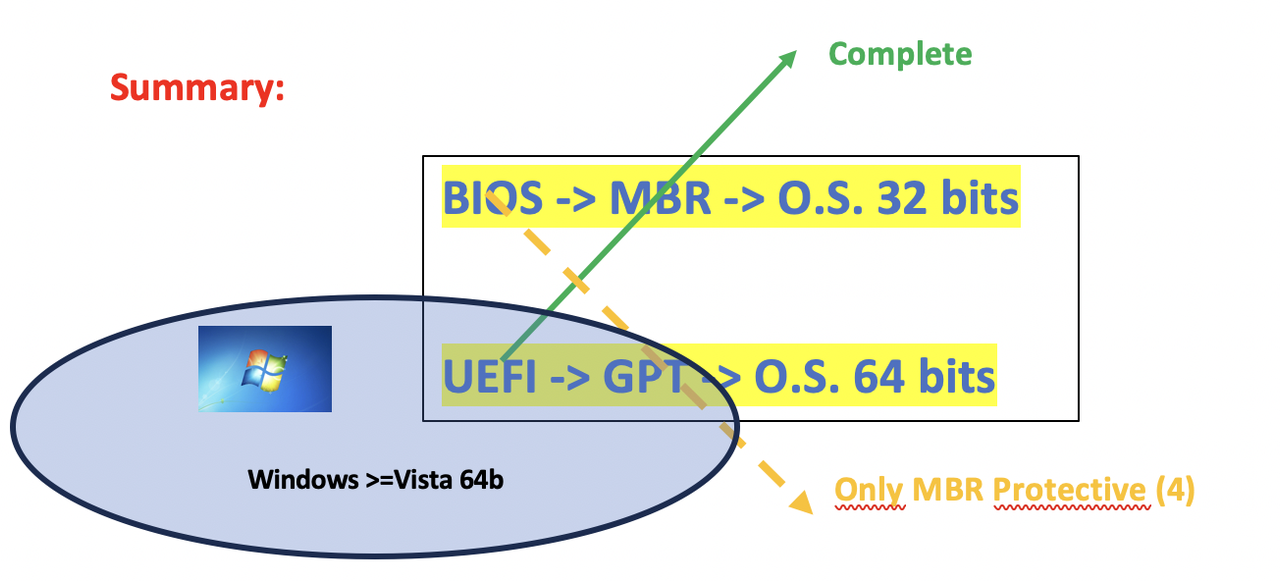
🤝 Compatibility
✔️ Perfect couples
- BIOS ❤️ MBR ❤️ 32b
- UEFI ❤️ GPT ❤️ 64bit
✔️ Some compatibilities
- UEFI 🤝 MBR
- BIOS 🤝 GPT(but only the 4 first partitions, thanks to MBR protective index) ❤️ 32b
✔️ For windows Windows >= Vista or numbered windows
like
windows vista,windows 7, 8, 9, 10 ,11...- If you are
Windows >= Vista or numbered windowsand want to use 64bits - UEFI and GPT and 64bits is mandatory
1
2
3
4
5
6
7
8
❓ If you have a windows xP and you want 64 bits
it could work with MBR and Legacy?
- well, maybe

❓ If you have a windows 10 and you want 64 bits
it could work with MBR and Legacy?
- NO!
- UEFI and GPT and 64bits is mandatory
1
2
3
4
5
6
7
8
9
10
11
12
13
14
15
16
17
18
❓ Sohee has an MBR disk, UEFI with a Windows 10 32 bits.
Her boss wants her to swap into Windows 10 of 64 bits.
Can she do this?

- NO!
- UEFI, GPT is mandatory for 64 bits for windows vista or numbered editions

Then, what should she do?
- UEFI can stay
- but convert MBR into GPT

❓ Can we convert MBR into GPT?
- can we place 4 students in a classroom with 128 seats?
- Yes, we can convert MBR into GPT

❓ Can we convert GPT into MBR?
- can we place 128 students in a classroom with 4 seats?
- Np, we cannot convert the GPT into MBR
✅ How to convert MBR into GPT
✔️ Importance of backup
- when converting from MBR to GPT,
- the computer tries to keep the information
- however, for just in case
- make a backup!
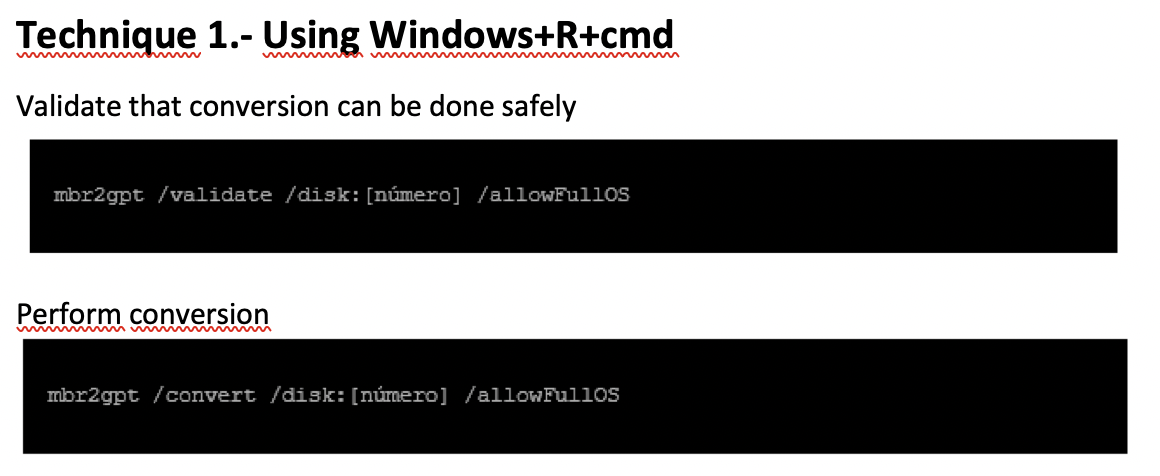
1️⃣ Use command mbr2gpt
Win + R > cmd > mbr2gpt
✔️ What happens if you are converting from MBR to GPT, it fails?
- the whole process will fail
✔️ This command has two steps
- (1)
/validate - validate if the convertion is possible,
before really doing it
- (2)
/convert actually does the conversion
/disk/(number of disk)- and apart from the steps
- we have to indicate which is the disk we want to convert
- command:
/disk/(number of disk) ⚠️ need to mention the
disk number⭕️, not the disk letter ❌!- for internal disk: number 0
- for external disk: number 1, 2, 3…
- 👀
/disk/0,/disk/1
- 👎🏻 very risky, maybe you mistakenly put a wrong number
- and you end up losing all information in a disk you didnt want to touch
✔️ Then followed by…
/allowFullOS- the OS in the GPT disk will be in the same order as the MBR
- very important, if you change the order of OS
- you can change the order of the booting
✔️ Summary of the whole command
[ ]indicate the real number, change into your number
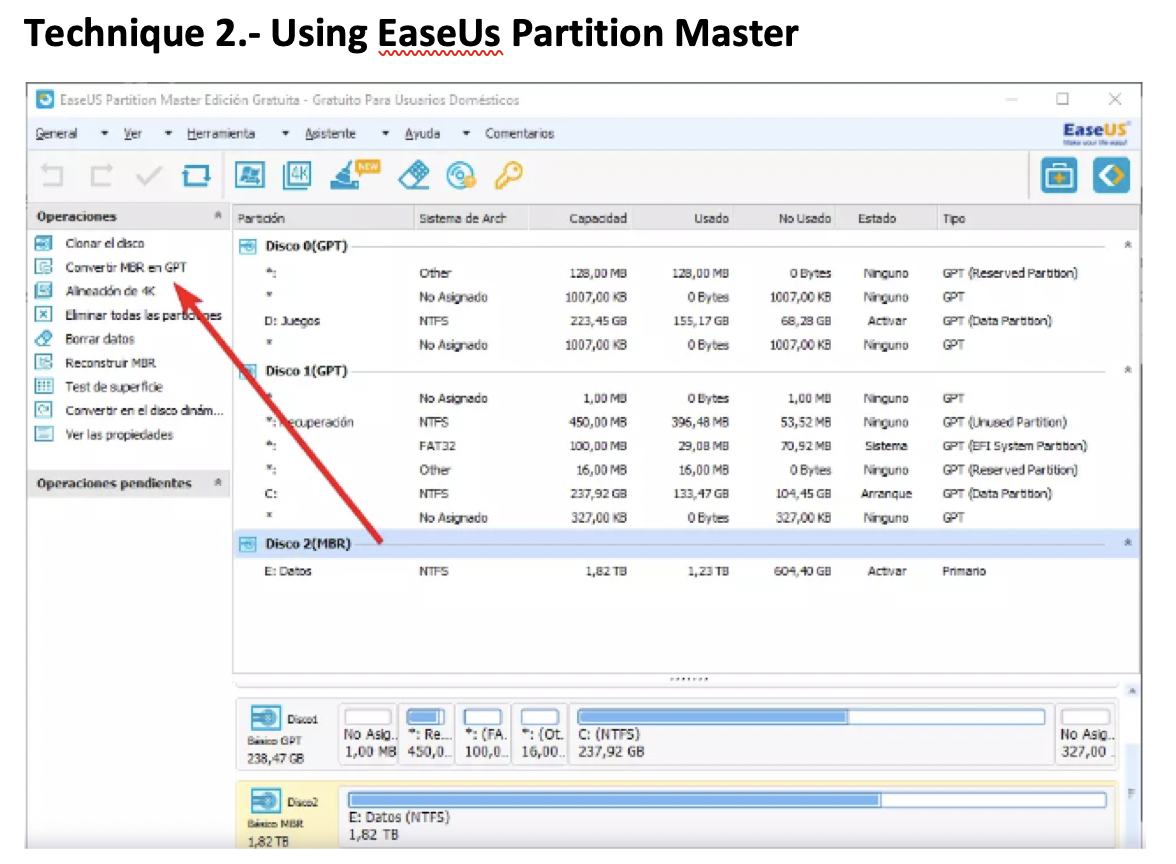
2️⃣ EaseUs
- a visual application
- has option
convertir MBR en GPT - just click and you can convert
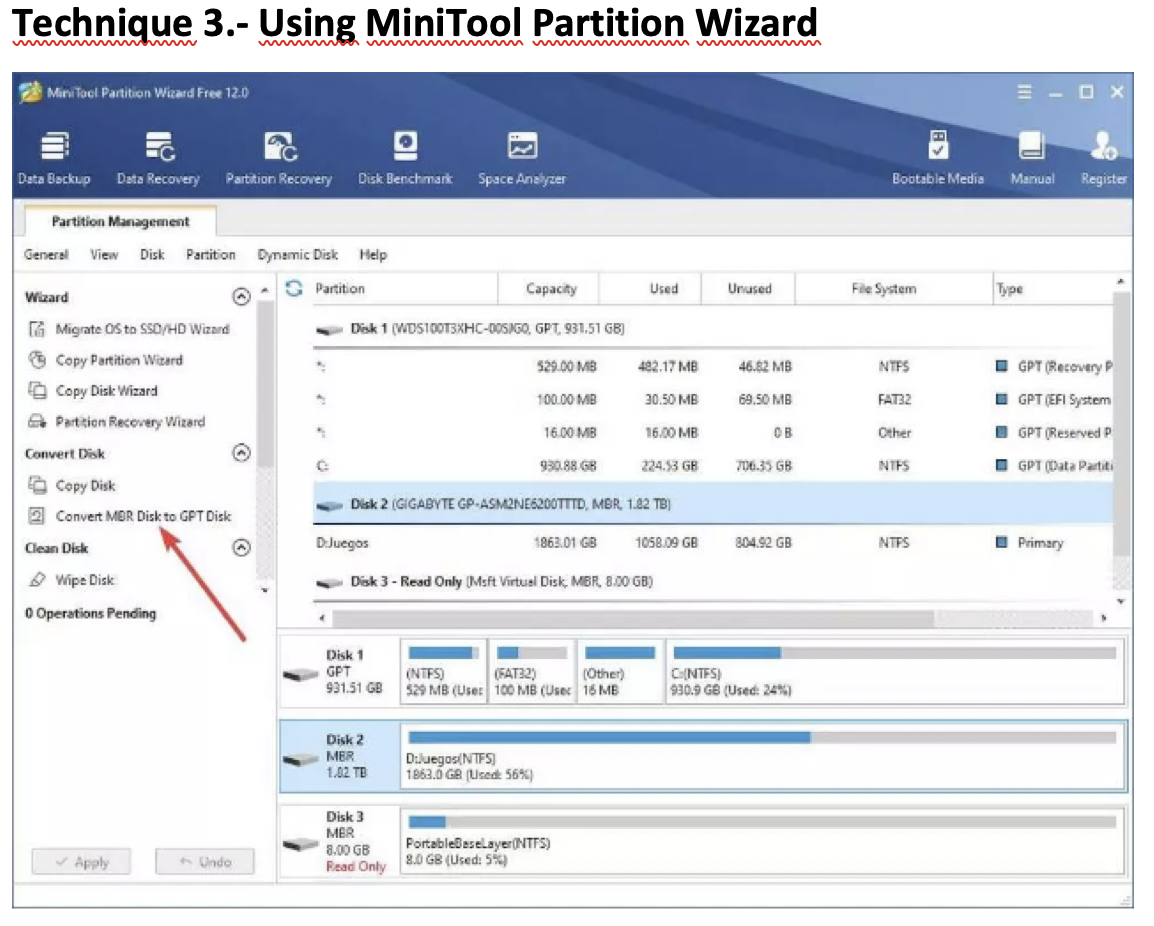
3️⃣ MiniTool Partition Wizard
- also a visual application
- click on
convert MBR Disk to GPT Disk - this application is also good for placing the Unallocated space inside the umbrella
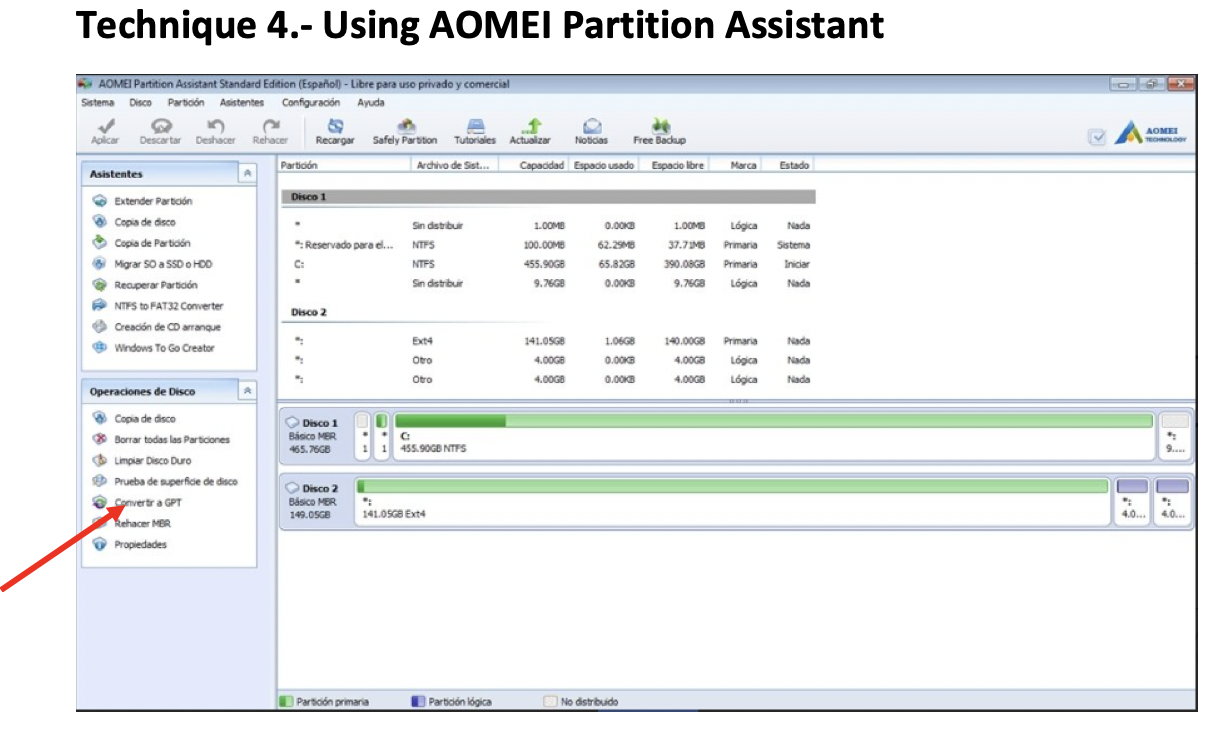
4️⃣ AOMEI
- also a visual application
- click on
convert to GPT but you have to pay
- also good for creating
OS To Go OS To Go: OS live- OS live: OS that you can use wo installing
✅
✅
✅
1️⃣
2️⃣
3️⃣
4️⃣
- 1️⃣
- 2️⃣
- 3️⃣
- 4️⃣ 👍🏻 👎🏻
1
2
3
⭐️⭐️⭐️ EXAM ⭐️⭐️⭐️
❓
👉🏻
This post is licensed under CC BY 4.0 by the author.