2.8 Process Dispatch
- ⭐️ Practical exercise of six algorithms
- ⭐️ One theory exam about states of the process
📌 Process Management
🟰 Process Dispatch
planificaciónn de processes
- once the process are in the RAM, I need to give them a certain order to run
- all processes need to be run
✔️ Goal of Process Dispatch
- once the processes are in the RAM
- Organizing all the processes to run/end successfully
- Important that user feels everything runs smooth,
- smooth: all processes is running at the same time
✔️ The processes in the RAM have different priorities
- In the RAM, there are processes you know that they are going to ❶ fail
- ❓ Should I pay attention to them with high priority?
No, leave them fail, give them no priority at all
- ❷ Other processes can have urgency, priority
- 1️⃣ Some urgent processes can be solved without the intervention of the CPU
- Some processes can be solved by another/other computer compoenent/resources
- 2️⃣ And the other urgent processes need to be priorized by the CPU
- CPU needs to think of the consequences of the intervention
- in order to give priority to the processes
- consequences: Maybe if the CPU does not interrupt, the urgent process might die, so this process has priority
- ☠️ goal is not to let any process die!
✔️ Aging
- Aging: letting a process get old is ok
- make a process wait is ok
- Some processes age
- if they do not die, its ok
- So CPU has to take consequences, aging into account before intervention
✔️ Standard Processes
- Standard Processes 🟰 not urgent processes
- Not urgent processes are left for the end/last
📌 Process Table
stored inside
OS in RAM
- also
.csvfile likepages table - data seperated by
, commas - but bc it is so complicated, we draw the
process tablelike a real table
☑️ PCB
- the
process tablehas a portion for each of the processes - The block is called
PCB, Process Control Block - the
PCBhas information about the process
1
2
3
4
Process Table
block for p1 = PCB1
block for p2 = PCB2
block for p3 = PCB3
☑️ Inside the PCB we have fields
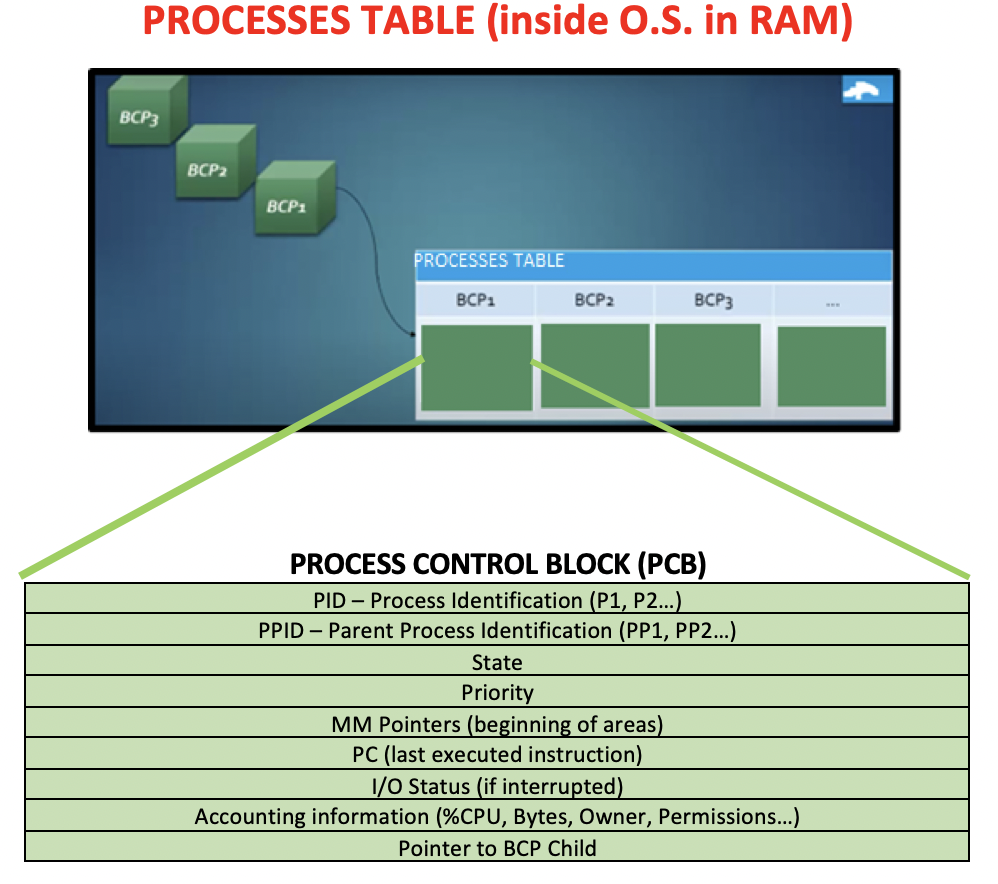
- fields of the processes
✔️ (1) PID
- process ID
- name of the process
✔️ (2) Parent Process ID
- the name of the process I come from/was born from
- ID of my parent process
- If I am malware, kill me, my parent, my children process
- 👉🏻
Parent Process IDandPointer to the BCP Childis stored inPCBfor the3 generation killing technique
✔️ (3) Pointer to the BCP Child
- the processes I created
- my children processes
- so where my children processes are located in the RAM
- pointer: address of the memory, address of position of the RAM
- If I am malware, kill me, my parent, my children process
- 👉🏻
Parent Process IDandPointer to the BCP Childis stored inPCBfor the3 generation killing technique
✔️ (4) Process state
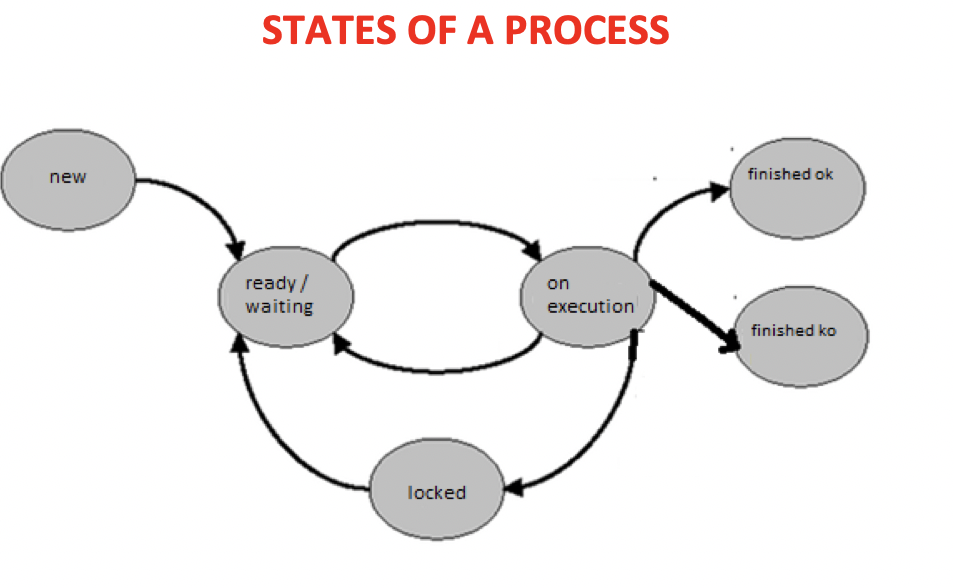
There are 6 different states
- 1️⃣
new: when process has just swapped into the RAM - 2️⃣
execution: when process has the CPU, foreground(primer plano) 3️⃣
waiting: another process has the CPU foreground, so I have to wait, so the process is in background(segundo plano)- some processes can be executed in the background, they are being executed but do not have the CPU
- 👀 automatic processes called deamons/services
- deamons: processes that be executed in the background automatically, without CPU
- in linux, they are called deamons
- in windows, they are called services
- 4️⃣
FOK: Finished OK: when the process finishes,swap outof the RAM - 5️⃣
FKO: Finished Not ok: does not finish ok, finish bc it has an error, or the user forces it to finish- 👀 process with an error, or administrator finishes bc it is collapsing the computer
- the process is
swapped outfrom the RAM radically, forcefully
- 6️⃣
Blocked:- (1) when the process is waiting for user interaction
- when the user accepts, the process goes back to
executionstate, and continue executing - when the user cancels, the process becomes
FKO - finished forcefully
- when the user accepts, the process goes back to
- (2) when the process is waiting for the peripheral
- 👀 you are printing and the printer is out of paper
- the printing process is waiting for the peripheral (printer) to be solved, to have paper again
- (3) sometimes processes are blocked bc of another processes
- (1) when the process is waiting for user interaction
- 1️⃣
✔️ (5) Priority
- presented in integer
- in linux, priority is a number from
-19 ~ 23 - in other OS, priority goes from
0 ~~ onwards - ⭐️ In computing,
0priority is the highest priority In linux,
-19is the top priority- ❓ How do you fight aging of a processes?
- aging: CPU does not pay attention to the process for a long time
- die: SWAP OUT
- 👉🏻 Improve the priority of the process that are old
- 👉🏻 Improving prioity⬆️ means making my priority number smaller⬇️, make me
0
✔️ (6) Main Memory Pointers
- Pointer: addresses of the RAM where the process has portions
- pointers point to the beginning to the address that the process is located
- pointers point to the base register(expressed in hexadecimal)
- but not in frames, it is written in hexadecimal
- 👍🏻 more secure
- MMP acts like a backup, written two times in
page table base registerandhexadecimal in PCB
✔️ (7) Program Counter
- indicator of which instruction was last executed
- backup of the PC in the neuman machine CU
✔️ (8) I/O status
- keeps information about the peripherals
- 👀 when I am writing on word, but I minimize and then maximize again
- the cursor is still blinking where I stopped.
- This is using the
I/O status - 👀 when I was playing music on youtube
- but I run another application, then I come back to youtube,
- youtube has where I stopped the music, instead of playing the music from the beginning again
- This is done using the
I/O status
✔️ (9) Accounting Info
- 1️⃣ how much CPU I am using
- If one process occupies 99% if the CPU and does not stop, you can
FKO - the process that takes too much of CPU, the computer collapes, you can expel
- 2️⃣ the Bytes that the program(when it was closed) occupied in the Harddisk
- the size of the program in the HD
- to check if the process is occupying too much space in the secondary memory
- 3️⃣ owner of the program
- 👀 Microsoft for word, excel
- 4️⃣ Permission
what that process can do on my computer
- if permission is
r : read, the process can only read information- 👀 adobe reader, you cannot modify PDFs, you can only read
- bc the permission is
r
- if permission is
w : write or modify, the process can write and modify on the computer- some processes with the
wpermission, sometimes you candelete - but the other processes, if the file has
honey, you cannot delete it
- some processes with the
- if permission is
x : execute, the process can execute things, create children processes
- if permission is
- 👀 EXAMPLE
1
2
3
4
5
6
7
8
9
10
11
12
13
14
15
16
17
18
19
20
21
22
23
24
25
26
27
PCB1 = P1, P3, Ex, 0, FAh, FBh, screen10*20, 90, 2MB, todovirus, w, P4, P5

name of the process: P1
parent: P3
Execution(state)
priority 0, with top priority
in RAM, stored in FAh
PC is FBh, the process has just started
    the process started in FAh, but if I executed now FBh, only executed a little bit
periperal, screen is doing smth like screen10*20
the process is using 90% of the CPU
small process, only uses 2MB
the creator of the process is toodvirus
the process has writing permission, it can write and modify my data
the process has two children, P4 and P5

👉🏻 You have to stop the process immediately
with top priority
collaping your CPU with 90%,
can modify with write permission

👉🏻 kill P1, P3(parent), P4 and P5(children process)

👉🏻 In case of doubt, the OS is a monarch
if some process looks wierd, they just kill the process
can the process have been innocent?
Yes, but still, if doubtful, kill
📌 6 Dispatching Algorithms
different algorithms of solving a RAM, processes
- These algorithms are also applied to daily situations
- 3 are not preemptive: once a process gets the CPU, no interruptions
FIFO,SJF,PNPE
- other 3 are preempritve:(expulsivo)
- although a process had the CPU, if a process has a higher priority
- the process gets interrupted
RR,SRTF,PPE
📈 GANTT Diagram
✔️ GANTT Diagram
- GANTT Diagram: diagram to show how processes will evolve, will behave
we need to check in the
processes tablethree things- 1️⃣ Time in: The arriving time of the process to the RAM, the swap-in time
- 2️⃣ Execution time(Tx): how many seconds the process needs to exectute
- 3️⃣ Priority of the process
- The diagram is 2D
x: timey: process
✔️ How to draw the GANTT Diagram
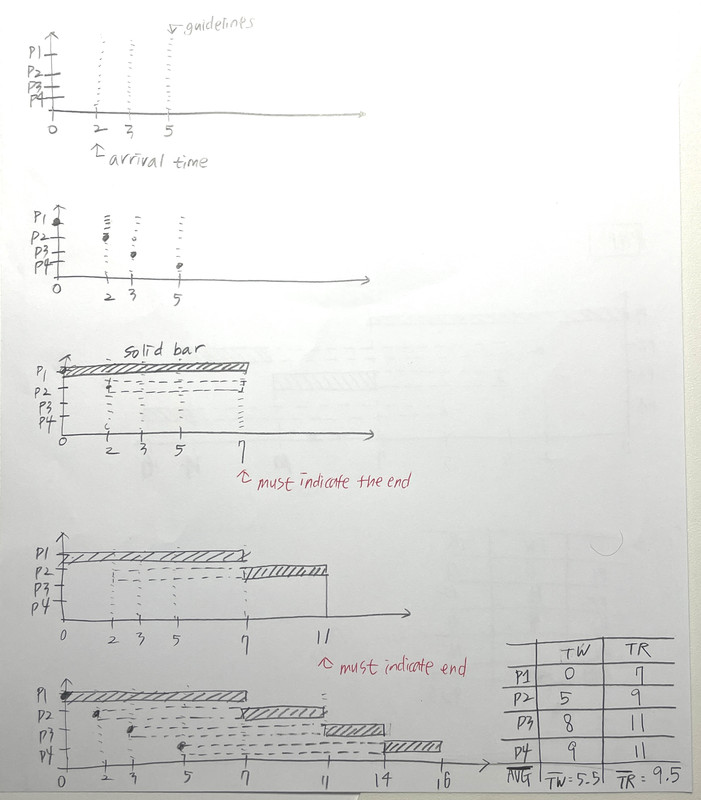
- step 1: Draw the x: time, y: processes
- step 2: Write the processes in order
P1~P4 - step 3: Draw the arrival times and guide lines of all the processes
- step 4: Draw the beginning point of the each process
- step 5: ⭐️ Overlapping is forbidden. Cannot have a process on top of another
- The CPU can only run one process
- so only one solid bar
- 🆚 solid bar: executing
- In order to avoid overlapping, the process wait until the previous process to finish.
- waiting bar is described in non-solid bars
- 🆚 dotted bar: waiting
From step 6 is continued in each algorithm…
- 🖥️ The computer does not draw any diagrams, just calculates the result table
✔️ Rule of Algorighm
- 1️⃣ Mandatory:
P1always comes first, always hasTWof0 - 2️⃣ All the algorithm finishes in the number of adding the process execution times
7 + 4+ 3+ 2 = 16- all algormithms must end in 16 seconds
- 3️⃣ If the best algorithm does not use priority, priority is useless in this case.
- So priority might not be the best option! Sometimes priority is useless
- 👀 Wrap up of results
- FIFO WT: 5.5
- FIFO RT: 9.5
- SJF WT: 4.5
- SJF RT: 8.5
- PNPE WT: 5.25
- PNPE RT: 9.25
- for these four processes, the best is SJF
✅ FIFO
First In First Out
non-preemptive
✔️ Rules
- The processes are attended in arriving order to the RAM
- Non-preemptive
- P1 is always the first to run with the CPU, then P2, P3…
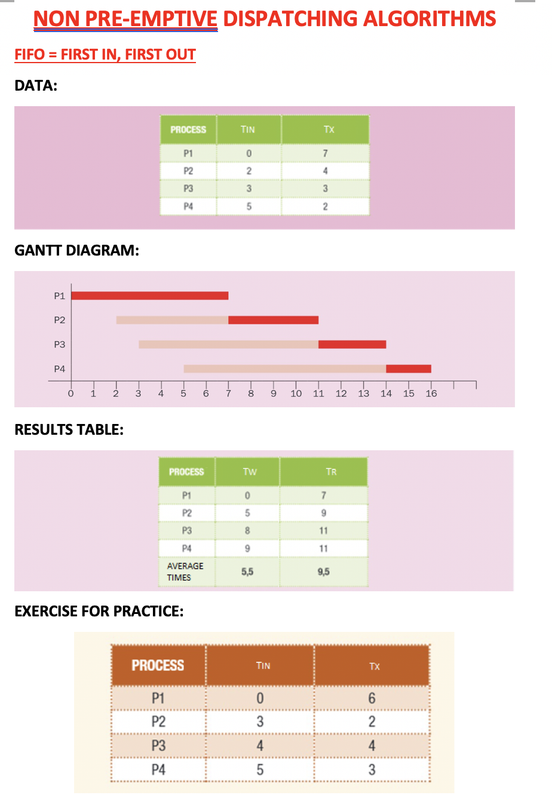
- The process that arrives in the second 0
- its a
deamon/service,automatic process - the user did not click and run the program ❌
- the process is run automatically
- so
P1is adeamon
✔️ Draw a GRANTT Table
- step 6: As we are in FIFO, draw each process
- step 7: Time that processes is run is drawn in solid bar, and you must indicate the end
- step 8: Create a
results tablewith waiting timeTWand result timeTR- waiting time: the dotted bars
- result time: add dotted bars + solid bars
- 💡 Mandatory:
P1always hasTWof0
- step 9: After creating the
results table, calculate the average waiting time and average result time- average is shown with a bar on top
✔️ Result of FIFO
- This means that with the processes
P1~P4,- FIFO makes them wait on average of 5.5 seconds
- and solve the RAM in average 9.5 seconds
✅ SJF
Shortest Job First
non-preemptive
✔️ Rules
- Although P4 is the shortest, P1 always first!
- Even P1 is long, we cannot waste time waiting for P4!
- After P1, then from short to long
✔️ Goals
- 👍🏻 lowers the temperature of the computer
- 👍🏻 you can swap the process out of your RAM
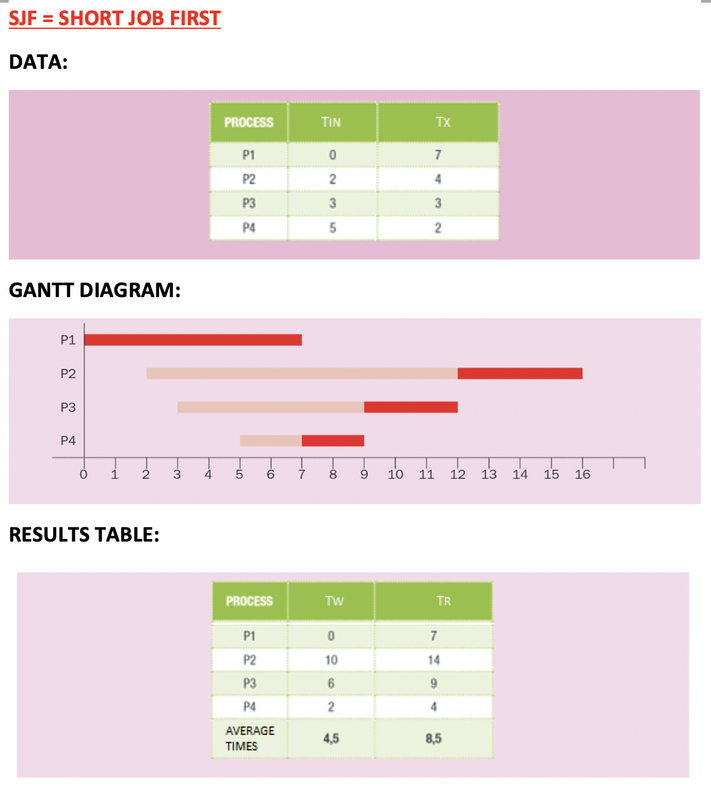
✔️ Draw a GRANTT Table
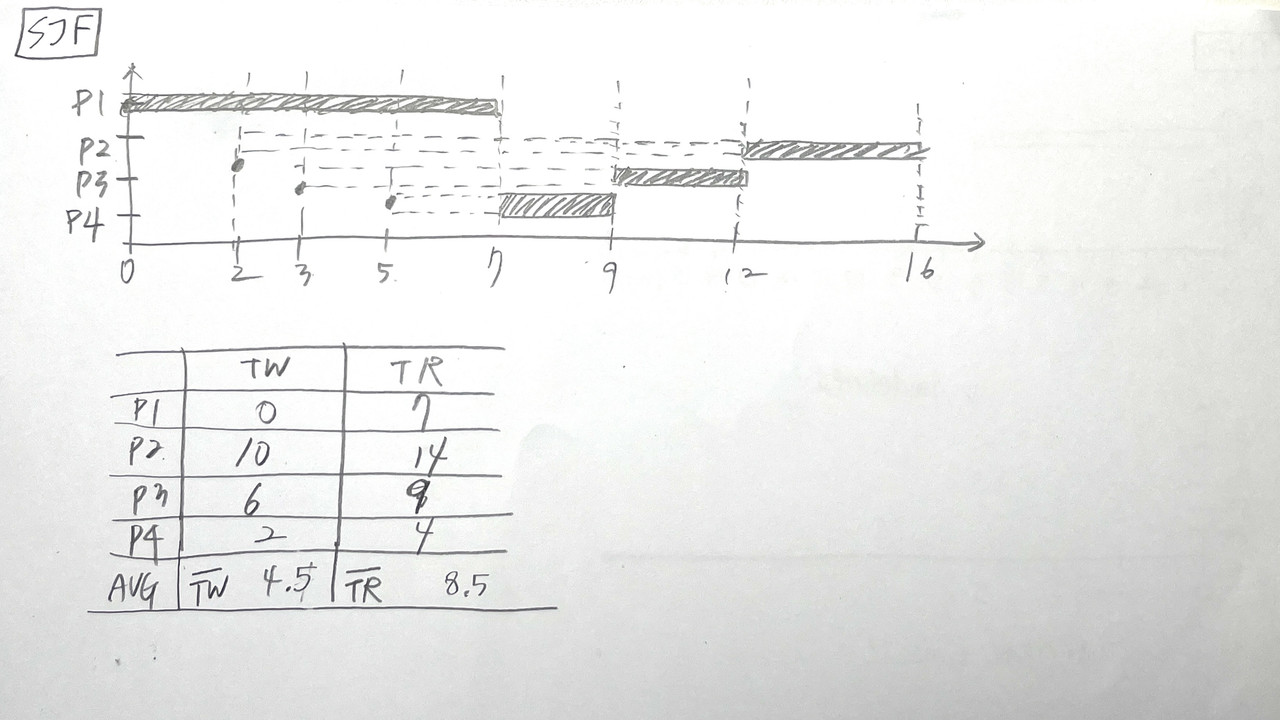
✔️ Result of SJF
- SJF has lower average
WTand lower averageRT⬇️ - SJF is better for these set of processes
- 🖥️ The computer pre-calculates the 6 algorithms and uses the one that is the most efficient
- The process dispatcher changes continuously from one algorithm to another.
✅ PNPE
Priority Non-Pre-Emptive
non-preemptive
- In the data table, you need the
priorityfrom theprocesses table
✔️ Rules
- P1 always runs first
- When P1 finishes, them from better priority(low in number) to worse priority(high in number)
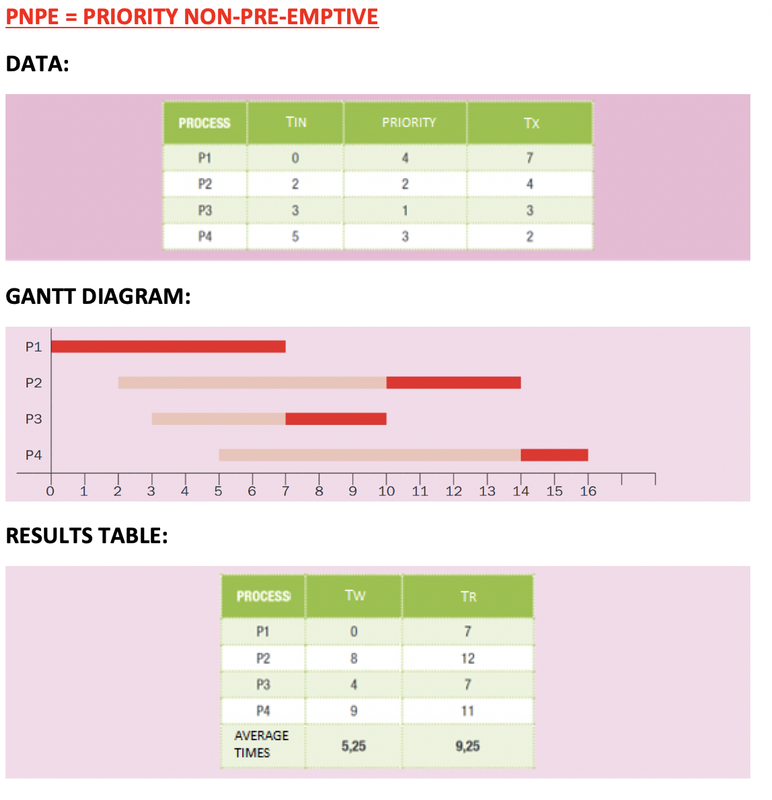
✔️ Draw a GRANTT Table
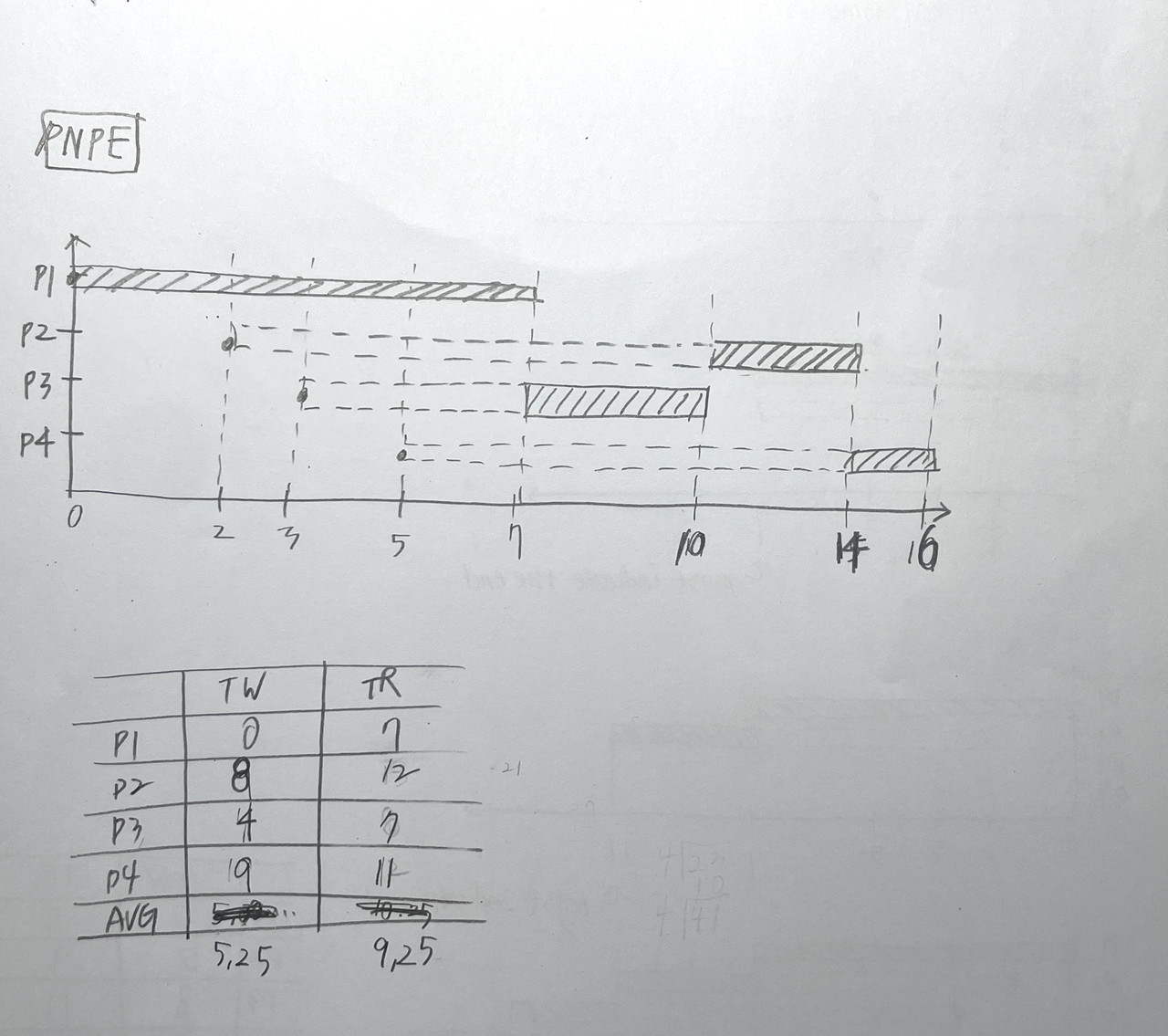
✔️ Result of PNPE
- 🖥️ The computer pre-calculates the 6 algorithms and uses the one that is the most efficient
- The process dispatcher changes continuously from one algorithm to another.
💡 Preemptive
- If a CPU is executing a process
- but a better process arrives
change the focus(
context)- stop the process that is being executed
- the stopped process is still kept in the RAM, NOT
swapped out❌ - the state of the process will be
Waiting - in the background
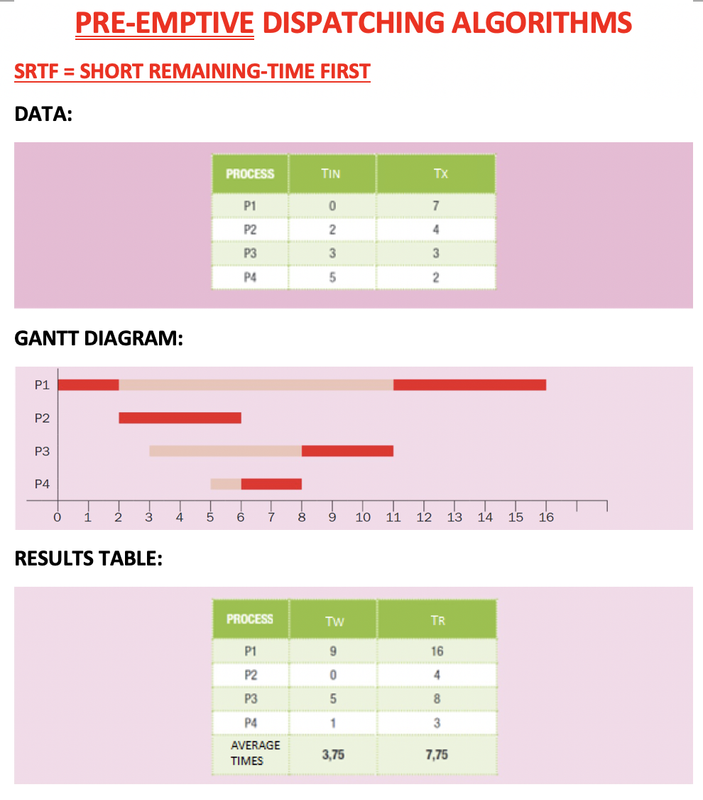
✅ SRTF
Short Remaining Time First
preemptive
✔️ Rules
- P1 always runs first
- But do not let it end if there is an arrival of another process
- 💡 Arrivals mean interruptions
- When there is an
interruption, we are going to do a case study. This happens bcSRTFispreemptive - Case study of remaining times of the process we are currently running, and the process that arrived. Who has shorter reamining time? The current one? Or the new process?
- We give focus to the process that has less remaining time
✔️ Goal
- to finish as much as processes as possible
- so computer does not get so hot
✔️ Draw a GRANTT Table
- P1 starts
- When P2 interrupts, draw a
x - We do a case study of
p1andp2
p1needs 5 seconds,p2needs 4 seconds
- Draw a circle on the winner process
p3 p3arrives, makes and interruption- Case study of
p2andp3
p2needs 3 seconds,p3needs 3 seconds
- In case of draw, do not change, and keep the running process
p4arrives, makes an interruption
p2needs 1 second,p4needs 2 seconds
- When a process ends, mark the second that ended ,
6, andtickthe finished process - Do a case study of all the left processes
- the process with shortest reamaing time runs
- 💡 Remember to mark the remaining time
- 세로선 긋고
x 축에초 second쓰기
- 세로선 긋고
- 💡 끝난 process에는 표시하기
✔️ - 💡
SRTFgives the idea of interactions to all the processes, does not leave any process untouched until the end compared toSJF
1
2
❓ Which is the processes being penalized? And why?
👉🏻 P1 and bc of its long running time, long remaning time
✔️ Result of SRTF
- Process that has a long running time will be left until the end, even if they arrive early
- Even if it seems more complicated as it keeps changing the process(chaning the context), than
SJF, it is considered more efficient RAM always has space problems, but not temperature problems
Avg TW: 4sec,Avg TR: 7.75 sec- more considered efficient than
SJF
✅ PPE
Priority Preemtipive
preemptive
✔️ Rules
- P1 starts
- Arrivals are considered interruptions
- Case study the priority
- If the priority of the new process that arrived is
less thanthe process that is currently executing
if P(new) < P(focused, running)change context- lower priority number means better process
- We change context to the new process
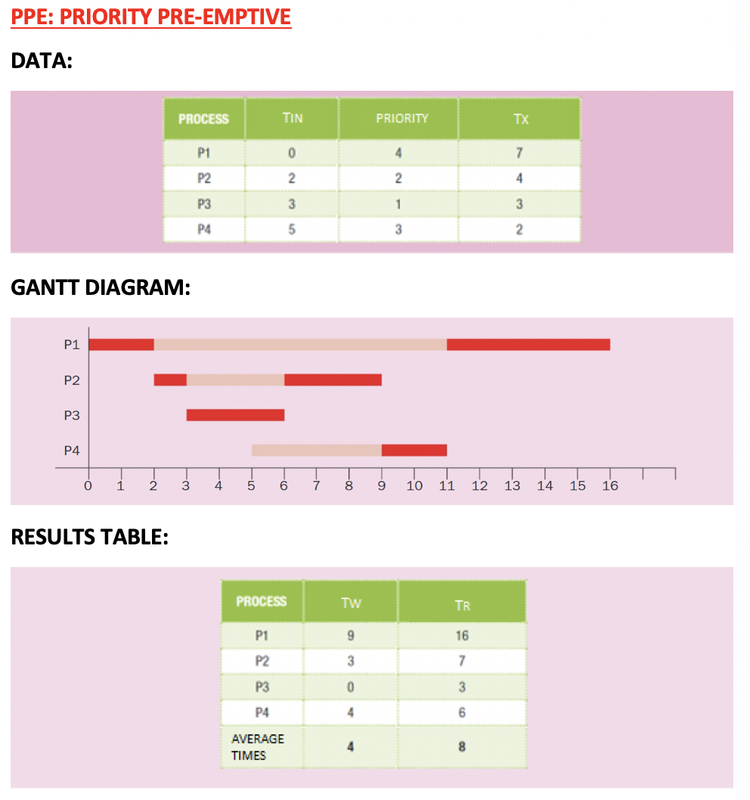
✔️ Draw a GRANTT Table
- P1 starts
- P2 interrupts
- Case study of priority of
p1andp2
p1has priority of 4p2has priority of 2
- P2 is the winner
- P3 interrupts
- Case study of priority of
p2andp3
p2has priority of 2p3has priority of 2
- P3 is the winner
- P3 has priority 1, it is going to win all the other processes. Once we give the CPU to the highest priority, no more interruptions, just let it run
- When one process ends, case study of all processes
- P2 wins
- 💡 Priority does not change, its not like remaining time that changes
1
2
3
4
5
6
❓ How many processes suffer from context changing?

👉🏻 two, P1 and P2

❓ Which is the processes being penalized? And why?
👉🏻 P1 and bc of priority
✔️ Result of SRTF
- worse than
SRTF - 🖥️ if
PPEis worse than another algorithm, computer will not take priority into account - 🖥️ Dispatcher does not consider one of individual processees, but focuses more on the collective perspective
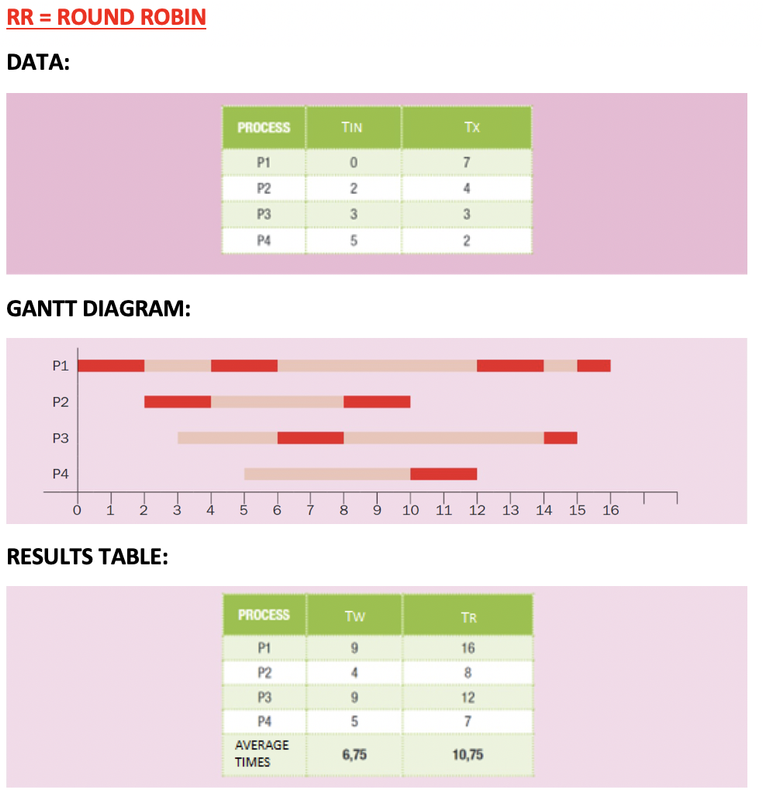
✅ RR
Round Robin
preemptive
most used algorithm for process dispatch these days
✔️ Rules
- P1 starts
- But, only for a **fixed time, called Quantum ** of
2 seconds of Quantum,Q=2. This fixed time depends on theOperating System
- Quantum: fixed time of each shift(turno)
- If during my
quantum(my turn)if there is an arrival, the arrived process goes to a waiting queue. I will not be interrupted - When I finish my
quantum, and if I need more time to run, I also go to thewaiting queue - In case of draw(
new process arrives and I also finished my quantum), new process arrived goes to the waiting queue first, then myself. This algorithm valuesequalityfor all the processes
- 👍🏻 Every process gets attention
- 👍🏻 When you want the user to feel that everything runs smoothly, user is running several processes at the same time, and feel like everything works at the same time
- 👎🏻 No process finishes
- 👎🏻 Many many changes of context
- 👎🏻 RAM is suffering
✔️ Draw a GRANTT Table
- Give 2 seconds of quantum to P1
- At
second 2,termination of p1 quantumandarrival of p2happens at the same time - In the Queue, add
p2andp1.p2is more valued, as all processes should be equal
- Queue:
p2p1
- Look at the queue, Run
p2, erasep2from thequeue
- Queue:
p1
- When
p2was running,p3arrived - Add
p3to the queue
- Queue:
p1,p3
- When
p2finishes, addp2to the queue
- Queue:
p1,p3,p2
- When
p1was running,p4arrived
- Queue:
p3,p2,p4
- When
p1finishes, I need more time, so add to queue
- Queue:
p3,p2,p4,p1
- Run
p3, then as I need more time, go to the end of the queue
- Queue:
p2,p4,p1,p3
- Run
p2, and finish! Do not add to the end of the queue❌, tickp2✔️
- Queue:
p4,p1,p3
- Run
p4and finish. Do not add to the end of the queue❌, tickp4✔️
- Queue:
p1,p3
- Run
p1and need more time, so go to the back of the queue
- Queue:
p3,p1
- Run
p3andp3only needs1 more secondso give it only1 second. Finishp3
- 💡 At the end of the processes, they need shorter quantums. Give them shorter quantums
- Finish
p1with1 second
✔️ Result of SRTF
- 👍🏻 All processes are run little by little
- 👍🏻 Algorithm most used by the dispatcher these days
- 👎🏻 Very high
average TW, TRtimes
💡 Tips for drawing the Gantt diagram
- 💡 No overlapping
- 💡 No empty seconds where nothing is running
✅ Different states of process
- 👀 P1 of
RR - In gantt diagram, there is no
locked/blocked, onlywaiting
1
2
3
4
5
second: state of process
0 : new
0-2, 4-6, 12-14, 15-16 : execution, foreground
2-4, 6-12, 14-15: waiting, background
16: FOK
1
2
❓ How long is process 1 inside the RAM?
👉🏻 16 seconds
1
2
3
❓ Two examples of process that is locked/blocked
- waiting for user interaction
- waiting for peripherals