2.7 Memory Management
⭐️ Practical exercise of segmentation, paging
practice in aula virtual
✅ Memory Management
Memory Management is for managing the RAM
does not apply for SM, HD
- how to save processes in the RAM
- when we open the files
- RAM and Secondary Memory are very far away
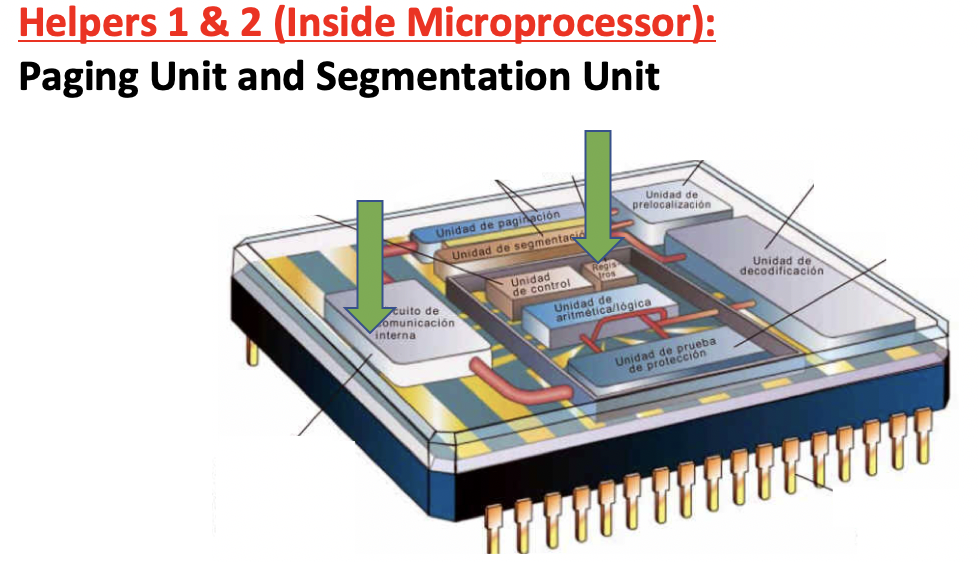
- To communicate between RAM and Secondary memory, we need an intermediate block to help
✔️ Intermediate blocks to help RAM and SM communicate
- 1️⃣ segmentation unit
- 2️⃣ paging unit
- ❓ Where is the segmentation unit and paging unit located?
- these units are inside the Microprocessor
✔️ Two units, two techniques to manage the RAM
- As there are two units, there are two techniques to maange the RAM
- 1️⃣ segmentation
- 2️⃣ paging
- each of the units proposes a way of placing processes in the RAM
- from the two techniques that places more processes⬆️ in the RAM using small amount⬇️ of RAM
1
2
3
4
5
6
❓ Tick the elements involved in placing processes inside the RAM?

👉🏻
Hard Disk (Has the OS so it’s involved)
RAM is also involved,
CPU is also involved (More specifically, segmentation unit and paging unit).

0️⃣ Swapping
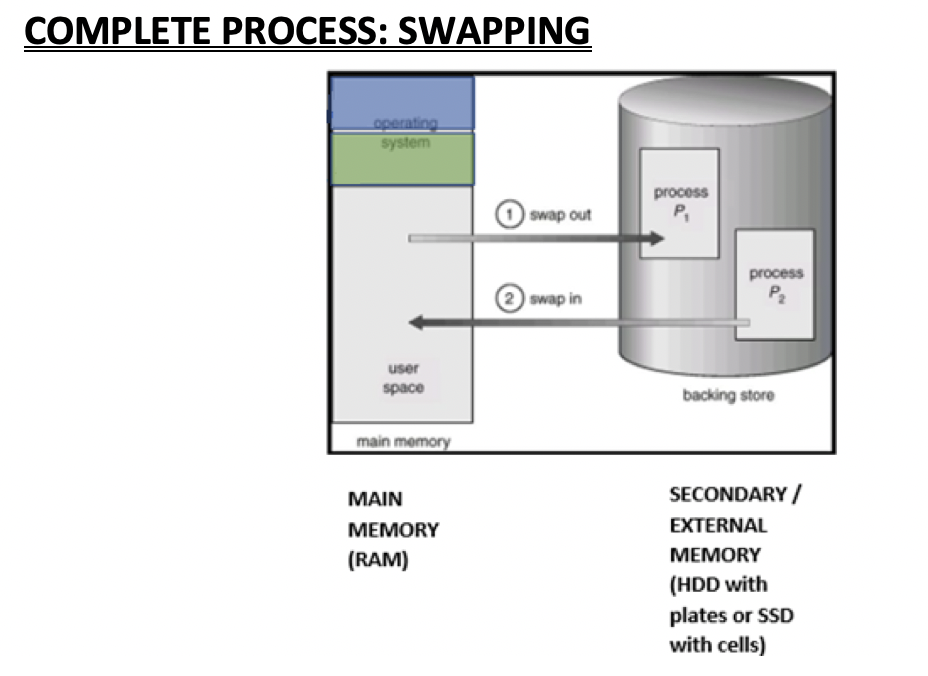
- 🚌 Processes travel through the front side bus
1️⃣ Segmentation
CANNOT break memory
ALL or NONE
IN or OUT of the memory
Order: big to small recommended
👎🏻 external fragmentation
- No possibility of breaking the memory
- One process goes completely goes inside the RAM, or cannot go on the RAM at all
If a process cannot go on a RAM, and it is left outside the RAM, you will not be able to run the process
- last space left in the RAM that is free is called
FREE SPACE
1
2
❓ Why does my program not running?
- No space on the RAM, cannot go on the RAM
1
2
3
4
5
6
7
8
9
❓ Swap out
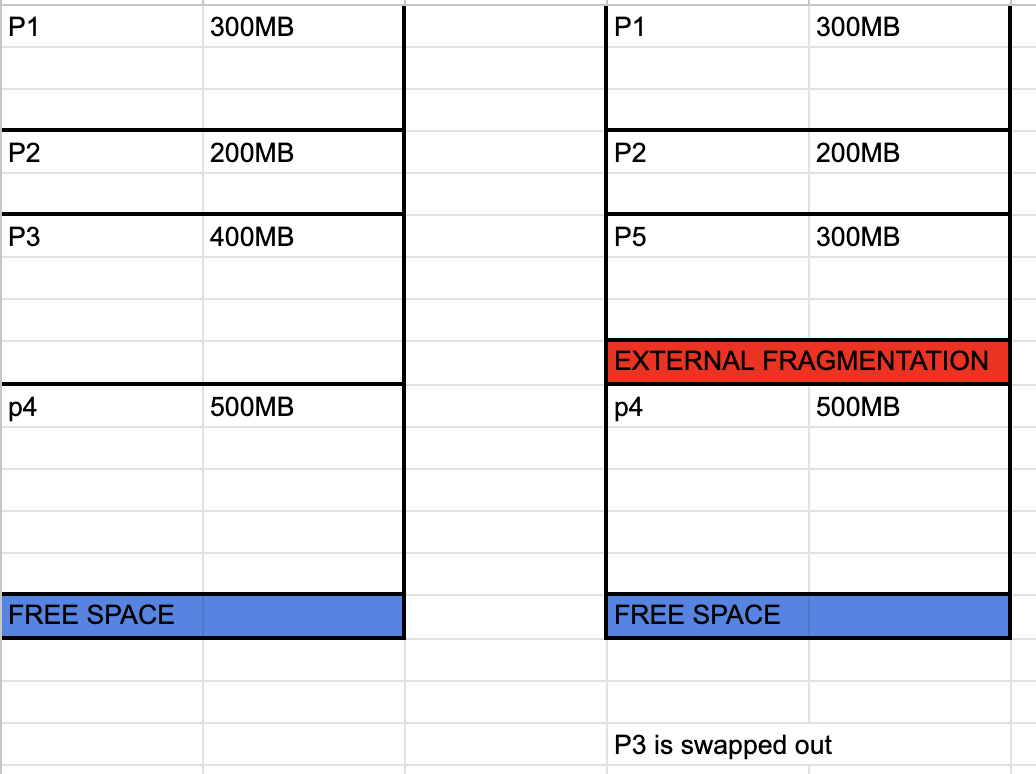
My RAM looks like this
P1 300MB
P2 200MB
P3 400MB
P4 500MB

If I want to run P5, which is 300MB, which process should I swap out?
- P1 or P3 or P4
☑️ Free Space
- The free empty portions in the middle of the RAM are known as
FREE SPACE - However, when free spaces are seperate they remain seperate
- you cannot join them into one big free space
1
2
3
4
❓ Imagine future processes P6, 7, 8,,,,,are all greater than 200MB, and you cannot swap out.
Can they swap in?

- NO
☑️ External Fragmentation
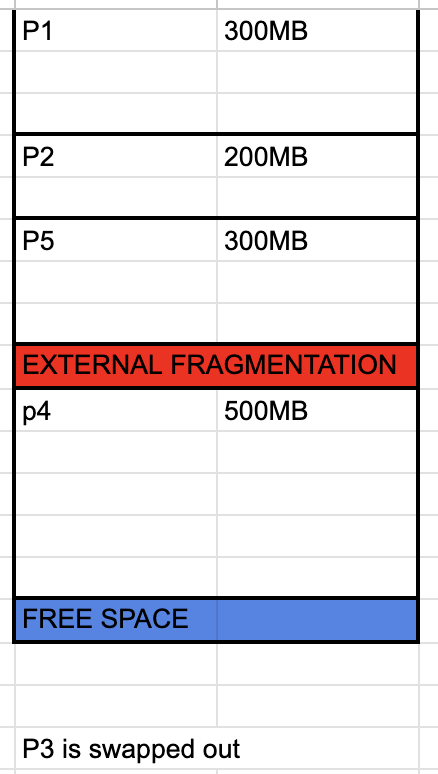
- So the wasted areas that are not occupied anymore is wasted forever
- they are called External fragmentation
- empty portions in the middle of the RAM
- ⚠️ (only the middle ones, the empty portion in the end is still called
Free space) - they are normally colored in 🔴 RED, to show that they are wasted
External fragmentation=100MB
☑️ Order of putting program on the RAM
- If you use segemtation,
- it is mandatoey to open the
big programsfirst, - then the
small programs - If you open the small programs first, later with
external fragmentation, you will not be able to open in big problems.
1
2
3
4
❓  Why in some companies, big programs like database, HR applications and the invoicing applications
are opened automatically in the begining of the session?

- Bc that system use segmentation
2️⃣ Paging
RAM fragmented into
frames, process intopages
ALL or NONE
Order of the processes going on the RAM does not matter
👎🏻 internal fragmentation
page table
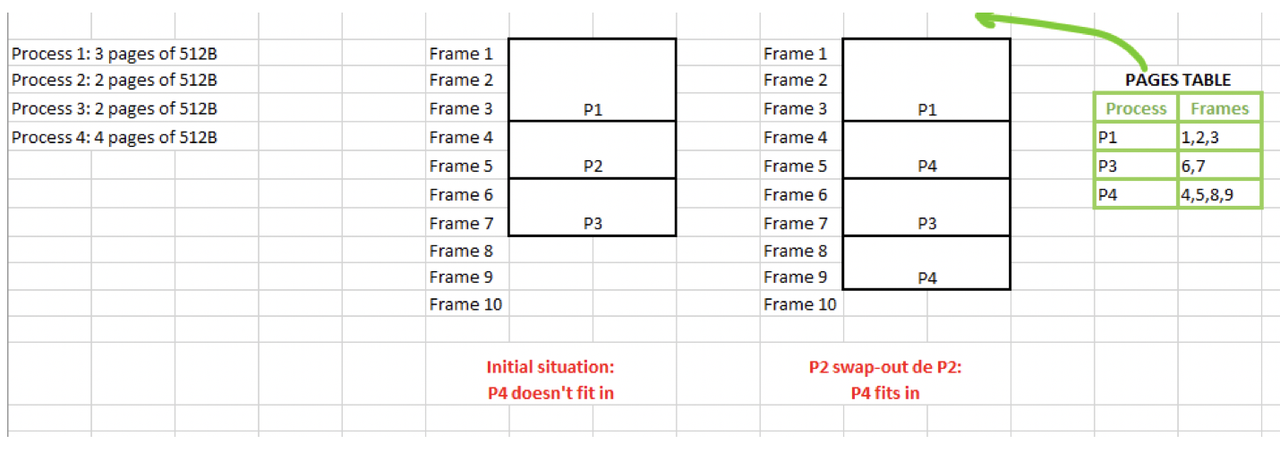
- RAM is divided into portions, which is called
FRAMES(Marcos) - your processes will also be divided into portions called
Pages - the
size of the framesneed to be greater than the size ofpagessize of the frames>=pages - One page per frame
- The process SWAPS IN if ALL its pages can go in.
ALL or NONE - Pages do not need to be in order when it goes into the frames
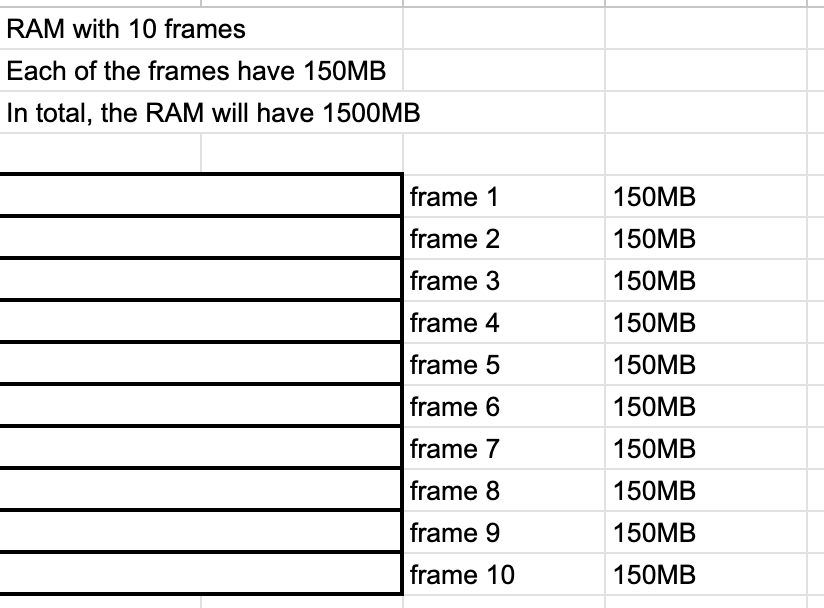
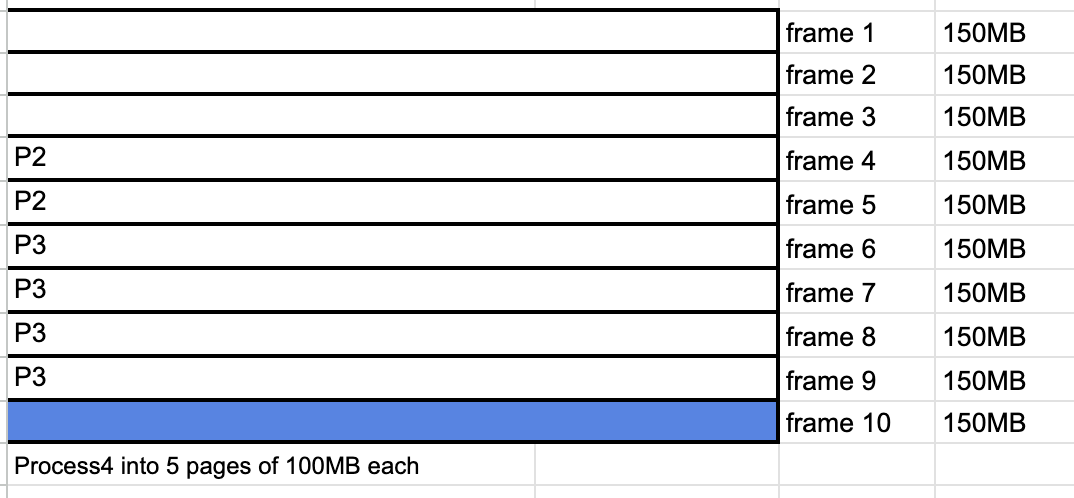
Process1 = 300MB: Divide Process1 into 3 pages of 100MB eachProcess2 = 200MB: Divide Process2 into 2 pages of 100MB eachProcess3 = 400MB: Divide Process3 into 4 pages of 100MB eachProcess4 = 500MB: Divide Process4 into 5 pages of 100MB each
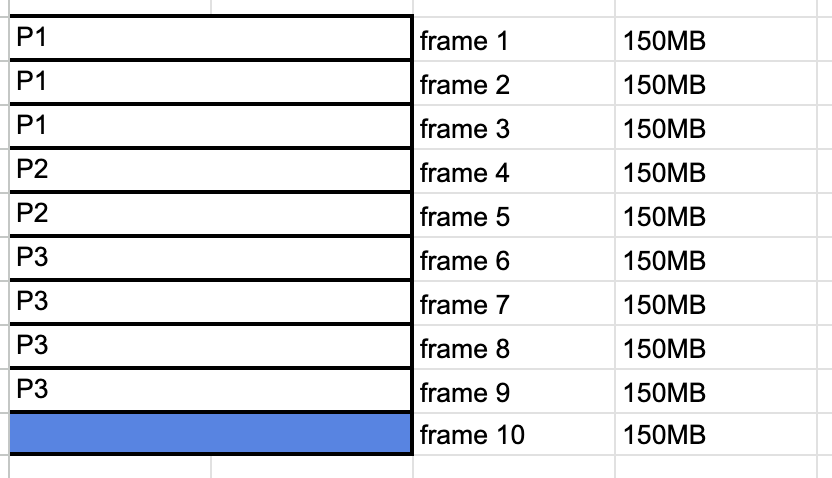
- If the whole process cannot go ALL on the RAM, then it cannot go on the RAM at all
Process4 of 5 pages(500MB)cannot go on the RAM at all, even if there is one frameframe 10left- The frames that are not used at the end are called
FREE SPACE
☑️ Internal Fragmentation
when the frame is bigger than the page
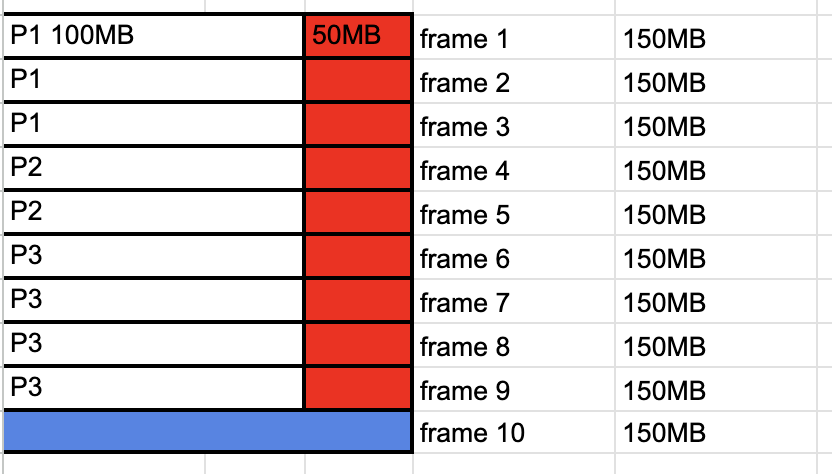
- Problem of Paging
- If frames are bigger than pages
- the frames are fragmented to 100MB and 50MB
- we are wasting space in each of the frames
- they are called Internal Fragmentation
- they are called internal as frames inside are fragmented, they have wasted portions
1
2
3
4
5
6
7
8
⭐️⭐️⭐️ EXAM ⭐️⭐️⭐️
❓ How much data is internal fragmentation in P1?
👉🏻 50MB

❓ How much total internal fragmentation of the RAM?
👉🏻 450MB
- Internal fragmentation does not take free space at the end into account
- Free space at the end is not Internal Fragmentation
- ❓ Can you get rid of internal fragmentation?
- Yes, make the
size of the pageto thesize of the frame size of the page=size of the frame- However, the
size of the frameis a factory setting that comes with a RAM - so when you buy a RAM, pay attention to
size of the frame - and adopt/modify OS
size of the pageto thesize of the frame - you cannot change the
size of the frame❌ - but you can adopt the
size of the page⭕️
1
2
3
4
⭐️⭐️⭐️ EXAM ⭐️⭐️⭐️
❓ How can you minimize  external fragmentation?
👉🏻 Open processes in a good order,
first big then small processes
- In general,
external fragmentationandinternal fragmentationis difficult to get rid of it - Thats why sometimes RAM seems to be smaller, less capacity then I think
☑️ Swap out, swap in
1
2
3
4
5
6
7
8
⭐️⭐️⭐️ EXAM ⭐️⭐️⭐️
❓ Swap P1 out, and decide if P4 can fit in.
P4: Process 4 fragmented into 5 pages of 100MB each
P4: Process4 into 5 pages of 100MB each

👉🏻 No, still only 4 frames
so P4 cannot go in
P4 stays out of the RAM
1
2
3
4
5
6
⭐️⭐️⭐️ EXAM ⭐️⭐️⭐️
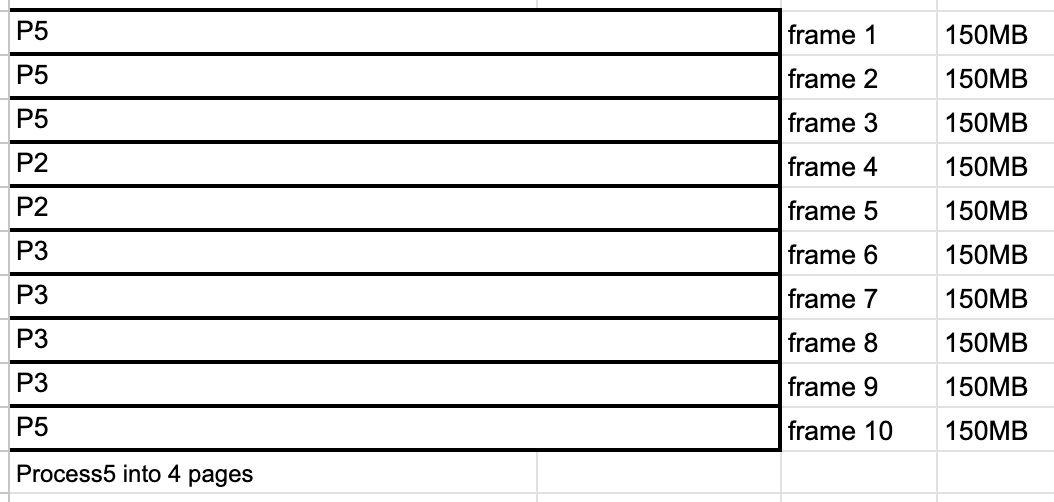
❓ Then what happens to P5,
P5: Process5 fragmented into 4 pages of 100MB each
👉🏻 YES, as there are 4 frames
and in Paging, order does not matter
but you can go on the RAM if there is sapce
- When process go in the RAM
- ALL or NONE
- but ORDER does not matter
☑️ Program Counter in Paging
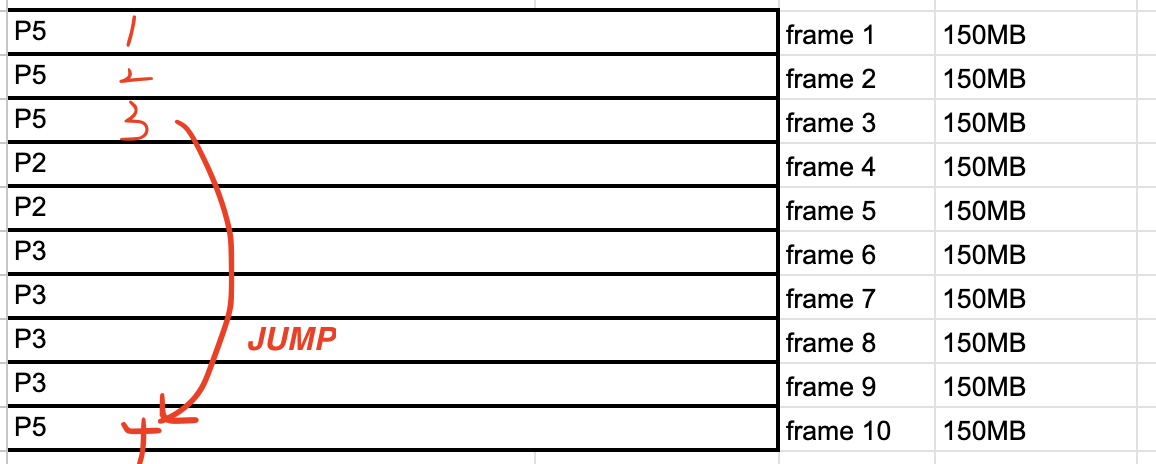
- In paging, the processes are not in order ❌
- so the computer should somehow know from P5 and jump over P2 and jump to P5
- so you need to know the order of the processes
- So paging needs
Program Counterof the Neuman Machine so
PCtells you which instruction comes next- Goal: give user a smooth experience
- I want my video to run smoothly, not suddenly pop up word file
☑️ Pages Table
inside the
OS in RAM
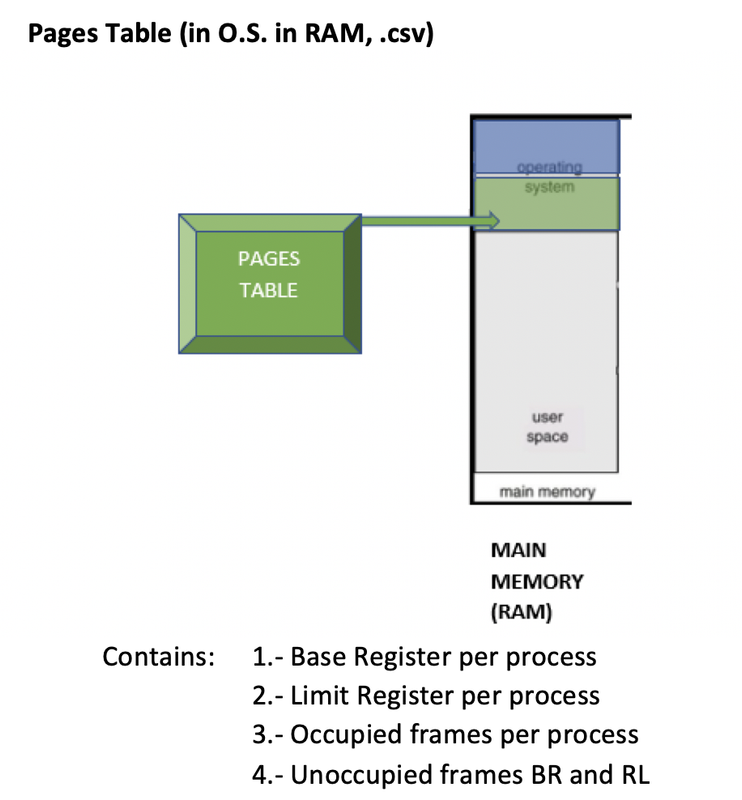
- I need a schema that has the order of the processes
This Pages Table is located in the
forbidden area of the RAM, the OS in RAMPages Tableis a file with.csvfile.csvfile: Comma Seperated Valueseverything in this file is seperated with
commas,Pages Tablecontains the followingPID,Frames of the process,Base Register,Limit Register,...rest of the processes...,Base Register of the free areas,Limit Register of the free areas
✔️ Contents of the Pages table
- PID:
- Frames of the process
- Base Register: beginning
- Limit Register: size of the process, how many frames does this process have
Base RegisterandLimit Registeris redundant(repeated)- as you can know start and size with
Frames of the process - 👍🏻 But we repeat for security!
📄 Design a Pages Table
- ✔️ Design a pages table for this RAM
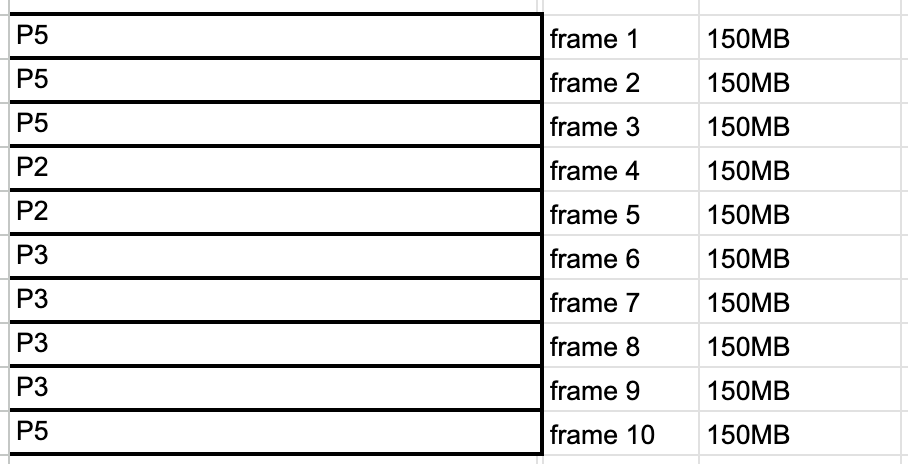
1
2
3
4
5
6
7
8
9
10
11
12
📄 Pages Table 📄
process name,
frames where is process has portions,
base register,
limit register


P5 , 1, 2, 3, 10 , BRP5 , 1 , LRP5, 4,
P2, 4, 5, BRP2, 4, LRP2, 2,
P3, 6, 7, 8, 9, BRP6, LRP3, 4,
FBR(Free Base Register, there is none free),
FLR(Free limit Register, there is no free limit register)
- ✔️ Design a pages table for this RAM
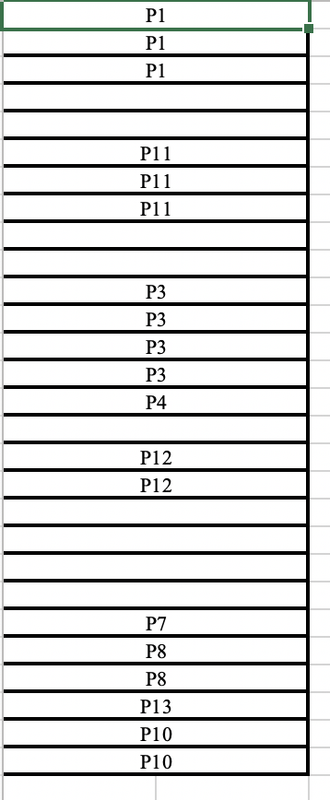
1
2
3
4
5
6
7
8
9
10
11
12
📄 Pages Table 📄
P1, 1, 2, 3, BRP1, 1, LRP1, 3,
P11, 6, 7, 8, BRP11, 6, LRP11, 3,
P3, 11, 12, 13, 14, BRP3, 11, LRP3, 4,
P4, 15, BRP4, 15, LRP4, 1,
P12, 17, 18, BRP12, 17, LRP12, 2,
P7, 23, BRP7, 23, LRP7, 1,
P8, 24, 25, BRP8, 24, LRP8, 2,
P13, 26, BRP13, 26, LRP13, 1,
P10, 27, 28, BRP10, 27, LRP10, 2,
FBR, 4, 9, 16, 19,
FLR, 2, 2, 1, 4
- All the free areas of the RAM
Base Registersgo togetherFBR, 4, 9, 16, 19
and all the free areas of
Limit Registersalso go togetherFLR, 2, 2, 1, 4
- ❓ Who uses the
Pages Table? - 1️⃣ Program Counter will use the
Pages Tableto jump around the RAM - to find the next instructions
Program COunter is in the CPU
- 2️⃣ The Paging Unit of the CPU will use the
Pages Tablefor memory management - to check where to put the next process on the RAM
1
2
3
4
5
⭐️⭐️⭐️ EXAM ⭐️⭐️⭐️
❓ Which block of the computer uses the `Pages Table`?
- Read by the Program Counter in CPU to jump in the RAM
- The Paging Unit in CPU to know if the process fits
- so the CPU
1
2
3
⭐️⭐️⭐️ EXAM ⭐️⭐️⭐️
❓ Should we protect the paging table?
👉🏻 YES
❓ OSRAM and macro virus
What happens if the macro virus is trying to enter the OS in RAM?
- Paging Unit never sends a process to a OS is RAM
- the macro virus will look like a normal process
P20 - Paging Unit will send the process to a normal address in RAM, not OS in RAM
- the virus will try to move internally in the RAM
However, in RAM, onced placed, you cannot move up and down internally
- ❓ So what does the virus do?
- If the virus tries to move,
- it creates corruption in the RAM
- it makes MS corrupt
- and the virus convinces the MS to go up and down the RAM
- and use MS to go up to the forbiden area, the OS in RAM
- and corrupts the
Pages Tableby changing the commas, and changing the numbers - so I make a huge mess of the
Pages Table and we cannot run processes in order
- ❓ How do I convince the MS to be corrupt?
- If the destination address for
MSwas1111, - the macro virus changes the number, to
0000 so that MS goes to the OS in RAM
- ❓ What should we do if the process has been intercepted by a virus?
- So if process is intercepted by the macro virus
- the macro virus should be swapped out
- However, the virus process could have created a child process
- the virus process could also have had a parent process
- 👉🏻 Thus, you need to swap out
3 generations(the process, parent and children process) - swap out ALL the related processes
- 👉🏻 Maybe swapping out 3 generations is too tough, but its for more security
- as parent/child process of a virus process was not corrupted.
- 👉🏻 But we will still swap out three generations, related processes for security
- This is called 3 Level Security
📌 Segmented Paging
- Paging is more complicated for the CPU
- If things work with segmentation, they use segmentation
- Computer first tries segmentation
- However, if the process cannot SWAP IN
- if things do not work with segmentation,
then the computer uses paging
- you page the free space of the RAM
- then use paging
✅
✅
✅
✅
✅
1️⃣
2️⃣
3️⃣
4️⃣
- 1️⃣
- 2️⃣
- 3️⃣
- 4️⃣ 👍🏻 👎🏻
1
2
3
⭐️⭐️⭐️ EXAM ⭐️⭐️⭐️
❓
👉🏻